09. Open Book Accessibility
- Short Term Accessibility - Start Here
- GETTING STARTED
- Determine whether legislation applies to the press
- Complete a VPAT
- Publish an accessibility statement
- Long Term Accessibility - Plan the Future
- PLAN
- CHECK
- LEARN
- Legislation - UK
- Legislation - EU
- Legislation - Denmark
- Legislation - France
- Legislation - Ireland
- Legislation - US
- Legislation - Canada
- Legislation - Australia
- Legislation - Aotearoa New Zealand
- Legislation - India
- Legislation - China
- Standards - Web Content Accessibility Guidelines (WCAG) 2
- Standards - Web Content Accessibility Guidelines (WCAG) 3
- Standards - EPUBs
- Standards - PDFs
- Standards - Other Formats
- Standards - Metadata
- Standards - Specialised Mark Up Languages
- Guidance
- Courses and Training Materials
- COMMUNICATE
- Communicating with Everyone - Accessibility Statements
- Communicating during Procurement - VPATs
- Communicating with Readers - Metadata and DAISY Reports
- Communicating with Authors - Author Guidelines
- Communicating Internally Across the Press - Accessibility Policy
- EVIDENCE
- About Us, More Support and FAQs
Short Term Accessibility - Start Here
Where do I get started with accessible eBooks? We can help.
There are many things you are already doing that you can translate now into essential documents that will help your press engage with accessibility. In the short term this will enable you to communicate with readers and libraries about accessibility, who only need to know what you are currently doing and plan to address in the future.
Our recommended short term activities are:
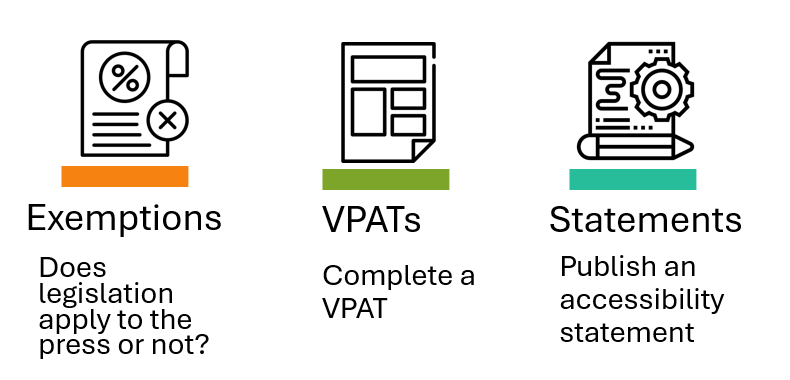
- Determine whether legislation applies to the press
- Complete a VPAT
- Publish an accessibility statement
That's it! Knowing your books already means you already have everything you need to complete these tasks. All you have to do is assign someone to complete this work and then read our quick guidance in the rest of this section, linked to in the numbered points above.
View this information as a video.
GETTING STARTED
Determine whether legislation applies to the press
In the EU, microenterprises with less than 10 employees and an annual turnover less than EUR 2 million or an annual balance sheet totalling less than EUR 2 million are exempt from the EAA accessibility requirements.
Most other parts of the world require an analysis to be completed that shows the size and cost of remediation work relative to the organisational finances and capacity. Only after this analysis is completed can a claim of exemption due to disproportionate burden be applied. This type of exemption is called something different in the different legislative acts: it is also known as undue burden or unjustifiable hardship. See our Learn section for all the details.
There are some exemptions for books that have been published before certain dates, see our Learn section for the details. Otherwise, legislation applies. Most country's legislation requires some version of WCAG AA to be achieved, alongside the publication of an accessibility statement, but this can vary and achieving WCAG compliance is a job for the long term. For now, just focus on determining exemption or not.
View this information as a video.
Complete a VPAT
A Voluntary Product Accessibility Template (VPAT) is a free template where you record the accessibility of your ebooks on a table. They are not a legal requirement and do not need to be published openly, but they help to communicate with libraries about the accessibility of your ebooks. It is completed at the whole publisher level rather than on the individual book level. This is the sole use case for a VPAT - to communicate accessibility to readers you would use book level information which is captured by metadata and DAISY reports. For more information on that see:
There is one row for each WCAG requirement, ordered by how strict they are A, AA and AAA. For each requirement, you give yourself a rating on this scale:
- Supports = the ebooks meet this requirement
- Partially Supports = the ebooks meet this requirement some of the time
- Does Not Support = the ebooks don't meet this requirement most of the time
- Not Applicable = this requirement is not relevant to the ebooks
- Not Evaluated = used on AAA requirements when you are only describing up to AA
There is also space to add more details of why you have given this rating, if you feel this is needed.
Our recommendations:
- Complete the WCAG VPAT template (other templates are available)
- Complete one VPAT for your whole press
- Only complete the VPAT for your ebooks, not the website, which is called Electronic Docs on the VPAT. If appropriate, you could split your notes into 'PDFs' and 'EPUBs' or some other meaningful way of dividing the service up, if there are very different accessibility issues.
- The VPAT does say 'Electronic Docs' where it would apply to static files, but still even more of them might not apply to your particular ebooks e.g. audio visual material
- Only complete the VPAT up to level AA, and mark the AAA requirements as not evaluated
- Use your own knowledge of your workflows to complete the initial VPAT, rather than doing full testing
- Update the VPAT annually as you complete testing and progress through your accessibility improvements
Example of a completed VPAT from Open Book Publishers
We have produced this document that describes each WCAG success criteria in plain language that is relevant to small presses. VPATs in plain language
We also produced more detailed guidance and collated training about VPATs in the long term.
View this information as a video.
Publish an accessibility statement
An accessibility statement is a publicly available statement that describes your organisational commitment to accessibility, the current accessibility of your ebooks, and your future plans for improving this. An accessibility statement is a legal requirement in many countries, with templates provided and minimum legal wording. You can find out more about this in our Learn section.
In general, this is what you need to include in an accessibility statement:
- A statement of organisational commitment to accessibility
- Initially, we suggest that the statement applies only to your ebook files as a whole, with plans to include your full website at a later time
- The date the statement was written
- Contact details for where accessibility enquiries can be sent to at the press. This is an important mechanism and you may also want to devise a system for managing these enquiries
And either:
Using your completed VPAT, describe:
- Overall whether you are compliant with legal minimum standards: fully, partially, or most of the time not compliant
- A list of the known aspects that are not compliant (e.g. some books do not have ALT text)
- Broadly how and when you will address these non-compliant aspects
Or:
- A statement that accessibility is a disproportionate burden (if you write this, you must provide an analysis evidencing this that can be produced on request)
We recommend publishing this statement on your website, and reviewing it every year.
For more detailed information and examples, see our page Accessibility Statements.
View this information as a video.
Long Term Accessibility - Plan the Future
Once you have completed the short-term accessibility tasks and are ready to think more fully about accessibility in the long term, we have extensive guidance to help you. The infographic below shows how we have structured this.
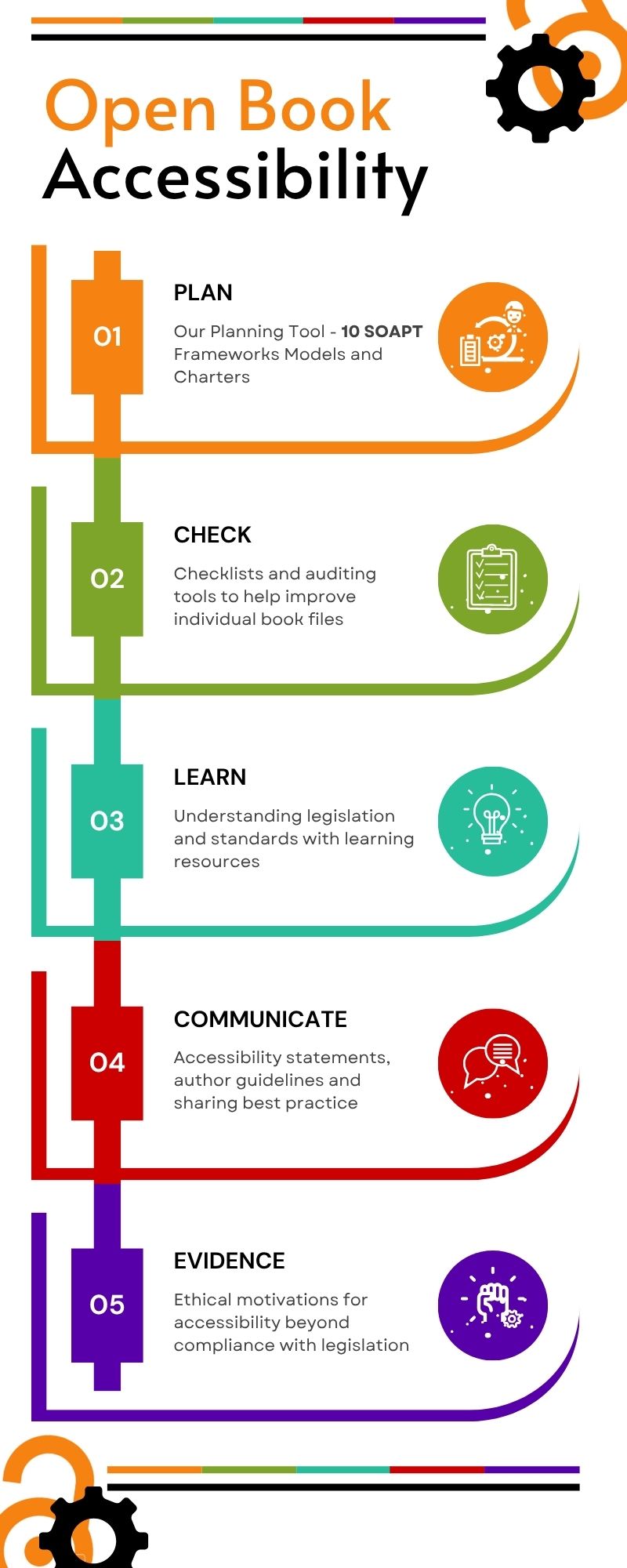
PLAN
Frameworks and planning tools to help achieve accessibility across the press.
Our Planning Tool - 10 SOAPT
The 10 Step Open Accessibility Planning Tool
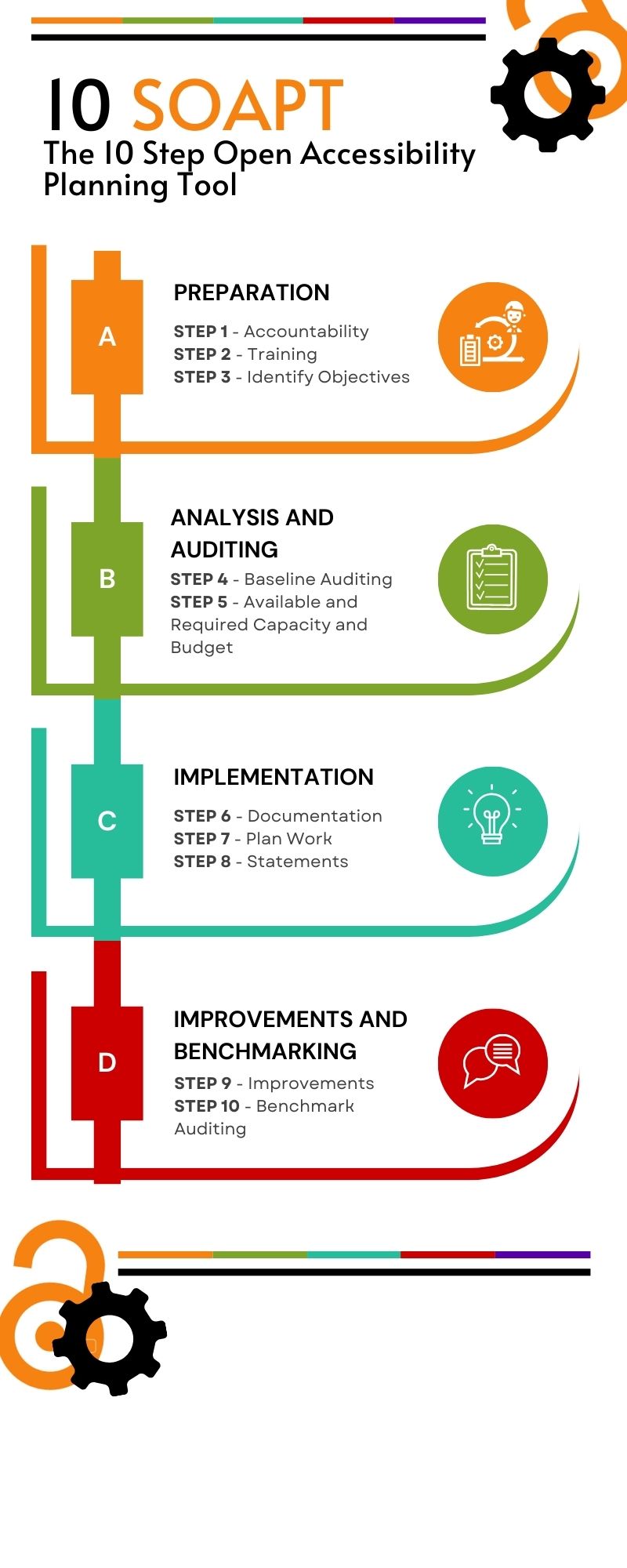
Our custom planning tool has been developed by Open Book Futures to help small presses achieve accessibility across their organisation. It consists of 10 steps organised into 4 sections A-D. For each step, we have developed guidance that is hosted here on our Copim Compass area that will help you understand it fully. Our guidance is organised into 5 areas: Plan, Check, Learn, Communicate and Evidence, and we link to the exact areas of each of those that are relevant to each of the 10 steps below.
Each of the 10 steps are given a list of tasks, with each task given a label of mandatory and optional. For this reason, the model is presented twice below - once in chronological order, and then again split by mandatory or optional tasks.
You can use the model as a self assessment tool, by giving each of the tasks a grading as below:
0 - Unaware
1 - Aware but not actioned
2 - Trying to action but some barriers
3 - Starting to action
4 - In the middle of actioning
5 - Actioned and achieved
And you can return to this self assessment at multiple points in your journey. We suggested assessing your Current Level, Desired Level and Achieved Level (after some improvements are made).
You can also access 10 SOAPT formatted as a spreadsheet: 10 SOAPT [Google Sheets]
View this information as a video.
10 SOAPT
Section A Preparation
Step 1 Accountability
Appoint a person to co-ordinate accessibility, who could be a dedicated accessibility professional or someone who has a wider portfolio of work that includes accessibility too. However, it's also important to remember that some accessibility work will be completed by almost everyone at an organisation.
Task A. Appoint a person to co-ordinate accessibility (recommended)
Task B. Ensure the whole press is aware they need to engage with accessibility tasks (recommended)
Task C. Consider external certification services (optional)
Step 2 Training
Plan technical digital accessibility training and support the identified staff to develop skills. See our Courses and Training Materials and Guidance pages. You can also look up a summary of your country's legislation and learn more about available standards in our section Learn.
Task A. Identify sources of suitable accessibility training (recommended)
Task B. Consider custom paid for accessibility training (optional)
Task C. Support the identified accessibility co-ordinator to develop skills (recommended)
Step 3 Identify Objectives
Once relevant staff have been identified and trained, some organisational accessibility objectives can be devised through requirements gathering exercises. Any organisation should aim to meet legal minimum requirements, but it's possible to be exempt from that (this requires work to evidence), and you may decide to go beyond in some areas if it fits with your organisational values. Also, your readership might already have made accessibility requests you haven't been able to meet yet, or you could survey your end users to capture this 'reader voice' in terms of accessibility requirements. Finally, it's possible there are some community or discipline specific considerations to include as well.
Task A. Consider applicability of legislation and whether the press is exempt (if so, plan to evidence this) (recommended)
Task B. Complete requirements gathering from readership (optional)
Task C. Capture community / discipline specific considerations (optional)
Task D. Consider where you might decide to go beyond legal minimum (parts of WCAG AAA or other accessibility features requested by readership or research discipline) (optional)
Section B Analysis and Auditing
Step 4 Baseline Auditing
Audit the current accessibility of all aspects of the organisation, including the frontlist and backlist book files, the website functionality and the backend submission platform. You could complete this yourself using self auditing, or employ an external auditor. You could also look at assessing current organisational knowledge, attitudes towards and motivations for engaging with accessibility work. You can find our overall guidance on auditing, including our custom Checklist OARC here: Check.
Task A. Consider capturing current organisational knowledge, attitudes towards and motivations for engaging with accessibility work (optional)
Task B. Complete Automated Testing (recommended)
Task C. Complete Manual Testing (recommended)
Task D. Complete Assistive Technology Tests (optional)
Task E. Complete End User Testing from Print Disabled People (optional)
Task F. Consider external auditing services (optional)
Step 5 Available and Required Capacity and Budget
Improving accessibility requires dedicated time and money, and a full consideration of where this can be diverted to accessibility goals will help with planning. It is likely that you will have some idea of how long book production tasks take, and how much extra work accessibility improvements will add to that, but it could be that you will need to understand more about the relative simplicity or complexity of individual accessibility requirements (like ALT text, or checking colour contrast). You can see our estimation of this within our custom Checklist tool OARC here: The Open Accessibility Review Checker (OARC).
Task A. Frontlist: Use checklist with complexity and current knowledge of workflows to estimate time required to complete accessibility tasks (recommended)
Task B. Backlist: Use checklist with complexity and current knowledge of workflows to estimate time required to complete accessibility tasks (recommended)
Task C. Plan and assign budget (recommended)
Section C Implementation
Step 6 Documentation
Capturing the results of identifying objectives, auditing, and analysing resources might happen across a range of documentation that could include: an accessibility policy, roadmaps, strategic plans, updated author guidelines, or other documentation. We offer guidance on producing documentation in our sections on Author Guidelines and Accessibility Policy.
Task A. Plan documentation that could include: an accessibility policy, roadmaps, strategic plans, updated author guidelines, or other documentation (recommended)
Task B. Create an Accessibility Policy (optional)
Task C. Update Author Guidelines to include accessibility tasks (mandatory)
Step 7 Plan Work
We recommend that frontlist and backlist/remediation are considered separately, and separate plans are made for the website including the backend submission process.
Task A. Front list / Born Accessible - Create accessible book files (recommended)
Task B. Back list / Remediation - Upgrade the accessibility of existing book files (recommended)
Task C. The Website functionality - Improve accessibility of HTML books and whole website (recommended)
Step 8 Statements
Publish accessibility statements and roadmaps on the organisation's website, and include VPATs and public policies if that is decided on. Our guidance on each is available at the links.
Task A. Create an Accessibility Statement on a public web page (recommended)
Task B. Update your initial VPAT (optional)
Task C. Consider sharing the Accessibility Policy openly, if decided on (optional)
Section D Improvements and Benchmarking
Step 9 Improvements
Incorporate planned accessibility improvements into workflows and complete the plan.
Task A. Complete the plan (recommended)
Step 10 Benchmark Auditing
Audit the accessibility and organisational knowledge at regular intervals within the plan to showcase improvements.
Task A. Audit again at regular intervals (recommended)
SOAPT by recommended/optional tasks
Recommended
Task 1A. Appoint a person to co-ordinate accessibility
Task 1B. Ensure the whole press is aware they need to engage with accessibility tasks
Task 2A. Identify sources of suitable accessibility training
Task 2C. Support the identified accessibility co-ordinator to develop skills
Task 3A. Consider applicability of legislation and whether the press is exempt (if so, plan to evidence this)
Task 4B. Complete Automated Testing
Task 4C. Complete Manual Testing
Task 5A. Frontlist: Use checklist with complexity and current knowledge of workflows to estimate time required to complete accessibility tasks
Task 5B. Backlist: Use checklist with complexity and current knowledge of workflows to estimate time required to complete accessibility tasks
Task 5C. Plan and assign budget
Task 6A. Plan documentation that could include: an accessibility policy, roadmaps, strategic plans, updated author guidelines, or other documentation
Task 6C. Update Author Guidelines to include accessibility tasks
Task 7A. Front list / Born Accessible - Create accessible book files
Task 7B. Back list / Remediation - Upgrade the accessibility of existing book files
Task 7C. The Website functionality - Improve accessibility of HTML books and whole website
Task 8A. Create an Accessibility Statement on a public web page
Task 9A. Complete the plan
Task 10A. Audit again at regular intervals
Optional
Task 1C. Consider external certification services
Task 2B. Consider custom paid for accessibility training
Task 3B. Complete requirements gathering from readership
Task 3C. Capture community / discipline specific considerations
Task 3D. Consider where you might decide to go beyond legal minimum (parts of WCAG AAA or other accessibility features requested by readership or research discipline)
Task 4A. Consider capturing current organisational knowledge, attitudes towards and motivations for engaging with accessibility work
Task 4D. Complete Assistive Technology Tests
Task 4E. Complete End User Testing from Print Disabled People
Task 4F. Consider external auditing services
Task 6B. Create an Accessibility Policy
Task 8B. Update your initial VPAT
Task 8C. Consider sharing the Accessibility Policy openly, if decided on
Other Frameworks, Models and Charters
The following are a curated list of available planning models or frameworks for achieving accessibility at an organisation through self assessment - there are currently 3 of these, with a short description of their structure. There is also a charter which we have included at the end.
AbilityNet Digital Accessibility Maturity Model (DAMM)
This functions as a 7 step management tool to help leverage all capacity at an organisation to map existing accessibility, devise roadmaps and check in on progress. This model has 5 “dimensions” that are seen as parts of an overall strategy: vision, leadership, processes, capability and procurement, and 5 levels of achievement in each. The free downloadable version of the model includes a list of suggested questions to ask when consulting with stakeholders.
AbilityNet HE and FE Accessibility Maturity Model
The HE and FE maturity model enables you to judge the maturity of your whole organisation's digital accessibility. This again has 7 sections with sets of questions with levels of 'agreement' as a response, which are then automatically scored to give you an overall rating of Bronze Silver or Gold. This interactive resource helps you:
- Determine where you are in the Accessibility Maturity Spectrum
- Understand risks; build on benefits
- Identify support needs
W3C Accessibility Maturity Model (draft)
This describes 7 “dimensions” where accessibility applies, including communications, ICT development lifecycles and the organisational culture, along with suggestions in each dimension of points (or organisational functions) where accessibility can be evidenced, as well as varying levels of achievement in each point. This practical and customisable guidance, with a structure for co-ordinating evidence, is the most helpful method of presenting information to busy, praxis based professionals.
Accessible Books Consortium Charter for Accessible Publishing
Our objective is to make our e-books accessible to all. With this objective in mind, we, the signatories to this Charter, hereby commit to:
- Stating our accessibility policy on our web-site, including adherence to this Charter;
- Nominating a senior manager who will be responsible for accessibility;
- Raising awareness among, and provide technical training for, relevant staff;
- Designating and publicising a point of contact in our organization to assist persons with print disabilities to access our publications;
- Testing our digital publications for accessibility, incorporating appropriate feature descriptions and metadata;
- Monitoring our progress in this area;
- Promoting the adoption of accessibility standards throughout the supply chain; and
- Supporting national and international collaboration with organisations representing persons with print disabilities so as to increase the availability of publications in accessible formats.
Contact us if you wish to become a signatory to the Charter for Accessible Publishing.
Certification
The following are a short list of service providers, who will certify ebook files as meeting accessibility standards.
Benetech’s Global Certificated Accessible (GCA) certification suite of services will evaluate the accessibility of EPUBs against WCAG and the accessible EPUB standard. GCA certification is achieved when three EPUBs from the same workflow receive a qualifying score, and the certification must be renewed annually.
Fondazione LIA's Ebook quality assurance will test both EPUBs and PDFs against a range of relevant international standards, using a team that includes print disabled users, and if compliant will allow an 'LIA label' to be displayed on the book's web page.
CHECK
Checklists and auditing tools to help improve individual book files.
Our Auditing Tool - OARC
OARC
The Open Accessibility Review Checker
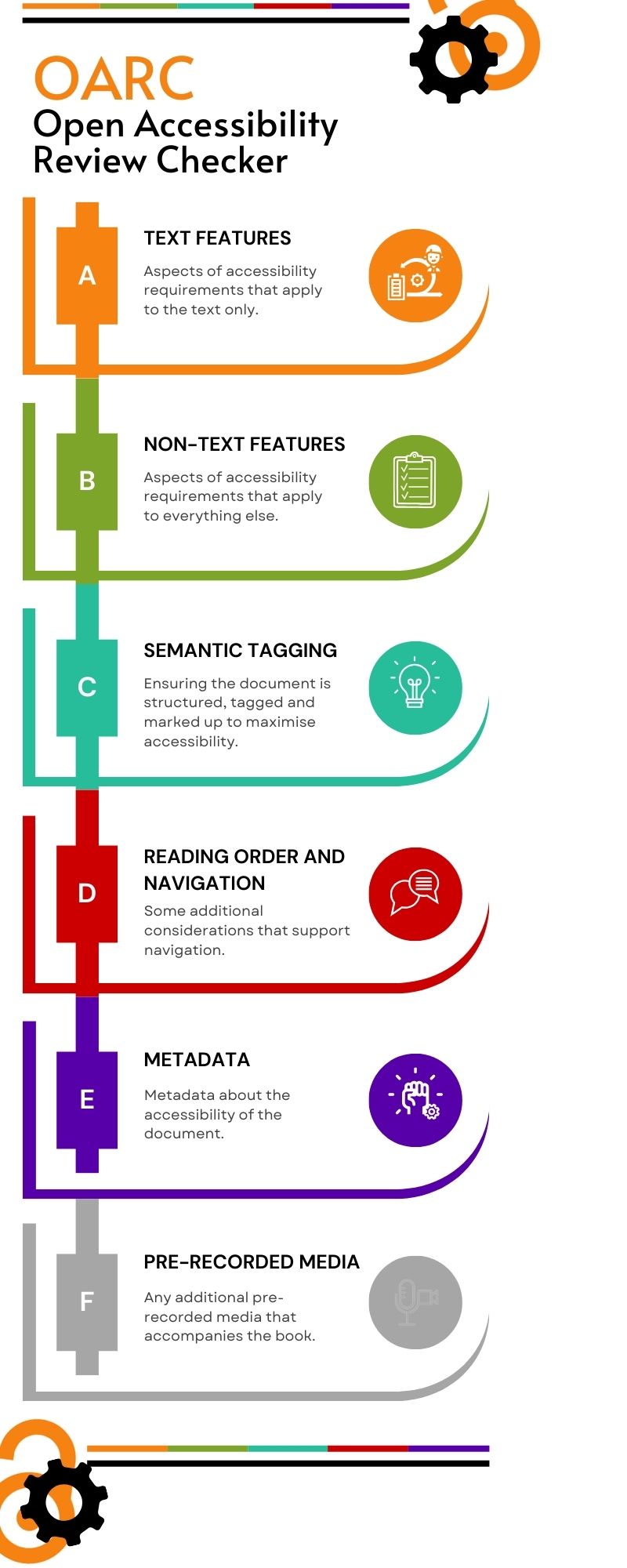
Our custom auditing tool has been developed by Open Book Futures to help small presses audit their static eBook files for accessibility. There are 40 points on the checklist, split into 5 sections: Text Features, Non-Text Features, Semantic Tagging, Reading Order and Navigation, and Metadata. There is an optional 6th section for if your book involves Pre-recorded Media, and for that there are 2 points. To determine these checklist points, we took out just the elements of WCAG that apply to static eBook files, removing those that apply to dynamic and interactive web pages, and adding in some additional EPUB or PDF specific points. Therefore the checklist is not suitable for auditing websites.
You can also access OARC formatted as a spreadsheet: OARC [Google Sheets]
On the spreadsheet you can find some additional context including whether each feature can be audited by a machine or needs to be done manually, and our approximation of how complicated each task is. Therefore, below, we present the checklist 3 times, in section order, and then split by human or machine audit and then by complexity.
View this information as a video.
OARC
A Text Features
- Text is actual text; not images of text.
- Colours of text has contrast ratio of at least 4.5:1
- Headings are descriptive of the content they contain
- Text is reflowable without causing horizontal scrolling or other problems
- Text can be resized without causing horizontal scrolling or other problems
- Line height and spacing, letter spacing and word spacing can all be changed without problems
- Orientation can be changed without problems
- Fonts are coded correctly
B Non-Text Features
- Non-text features (figures, graphics, captions, links, mathematical expressions) have meaningful ALT text
- Colours of non-text features (figures, graphics) has contrast ratio of at least 3:1
- Non-text features (figures, graphics, captions, links, mathematical expressions) have multiple ways of conveying meaning
- Links are accessible and meaningful
- Other clickable elements are 24 x 24 pixels
- Other clickable elements have visible text that matches the text in the underlying code
- A list's numbers, letters or bullets are displayed and tagged correctly
- A tables's headers, rows and columns are tagged correctly
C Semantic Tagging
- Non-decorative/real and decorative/artefact content is all tagged correctly
- Non-text features (figures, graphics, captions, links, mathematical expressions) are tagged and grouped correctly
- Lists, tables and TOCs are tagged correctly
- Headers, footers, notes and references are tagged correctly
- Headings are tagged as headings
- Headings have just 1 <H1>, at the beginning
- Headings <H2>-<H6> don't skip levels
- No headings <H7> or higher
- Other non-PDF structure elements tagged correctly (EPUBs)
- PDF tags support the separate reading order (PDFs)
- PDF role mapping is correct (PDFs)
- Other structure elements in PDF tagged correctly (PDFs)
D Reading Order and Navigation
- Multiple ways to navigate
- Static page breaks are present (EPUBs)
- Static page breaks are navigable (EPUBs)
- Navigation consistent throughout
- Reading/focus order retains meaning when using tabs or a screenreader
- Repeating blocks of content can be skipped
E Metadata and Conformance reporting
- File has metadata
- File metadata has a title that is used instead of file name
- File metadata has a valid language
- Where the language changes, individual parts have a valid language
- Source of static page breaks/pagination is identifiable (EPUBs)
- File metadata includes full accessibility conformance information
F Pre-recorded Media (optional)
- All audio only content has an alternative suitable for individuals with a hearing impairment
- All video only content has an alternative suitable for individuals with a visual impairment
OARC by auditing type
Machine/Automated Auditing
A2. Colours of text has contrast ratio of at least 4.5:1
A8. Fonts are coded correctly
B2. Colours of non-text features (figures, graphics) has contrast ratio of at least 3:1
B5. Other clickable elements are 24 x 24 pixels
B6. Other clickable elements have visible text that matches the text in the underlying code
C6. Headings have just 1 <H1>, at the beginning
C7. Headings <H2>-<H6> don't skip levels
C8. No headings <H7> or higher
C10. PDF tags support the separate reading order
C11. PDF role mapping is correct
C12. Other structure elements in PDF tagged correctly
D1. Multiple ways to navigate
D2. Static page breaks are present
D3. Static page breaks are navigable
E1. File has metadata
E2. File metadata has a title that is used instead of file name
E3. File metadata has a valid language
E4. Where the language changes, individual parts have a valid language
E6. File metadata includes full accessibility conformance information
Human/Manual Auditing
A1. Text is actual text; not images of text
A3. Headings are descriptive of the content they contain
A4. Text is reflowable without causing horizontal scrolling or other problems
A5. Text can be resized without causing horizontal scrolling or other problems
A6. Line height and spacing, letter spacing and word spacing can all be changed without problems
A7. Orientation can be changed without problems
B1. Non-text features (figures, graphics, captions, links, mathematical expressions) have meaningful ALT text
B3. Non-text features (figures, graphics, captions, links, mathematical expressions) have multiple ways of conveying meaning
B4. Links are accessible and meaningful
B7. A list's numbers, letters or bullets are displayed and tagged correctly
B8. A tables's headers, rows and columns are tagged correctly
C1. Non-decorative/real and decorative/artefact content is all tagged correctly
C2. Non-text features (figures, graphics, captions, links, mathematical expressions) are tagged and grouped correctly
C3. Lists, tables and TOCs are tagged correctly
C4. Headers, footers, notes and references are tagged correctly
C5. Headings are tagged as headings
C9. Other non-PDF structure elements tagged correctly
E5. Source of static page breaks/pagination is identifiable
F1. All audio only content has an alternative suitable for individuals with a hearing impairment
F2. All video only content has an alternative suitable for individuals with a visual impairment
OARC by complexity
Easy wins
A1. Text is actual text; not images of text
A2. Colours of text has contrast ratio of at least 4.5:1
A4. Text is reflowable without problems
A5. Text can be resized without problems
A6. Line height and spacing, letter spacing and word spacing can all be changed without problems
A7. Orientation can be changed without problems
B5. Other clickable elements are 24 x 24 pixels
B6. Other clickable elements have visible text that matches the text in the underlying code
B7. A list's numbers, letters or bullets are displayed and tagged correctly
C1. Non-decorative/real and decorative/artefact content is all tagged correctly
C2. Non-text features (figures, graphics, captions, links, mathematical expressions) are tagged and grouped correctly
C3. Lists, tables and TOCs are tagged correctly
C4. Headers, footers, notes and references are tagged correctly
C5. Headings are tagged as headings
C6. Headings have just 1 <H1>, at the beginning
C7. Headings <H2>-<H6> don't skip levels
C8. No headings <H7> or higher
C9. Other non-PDF structure elements tagged correctly
D1. Multiple ways to navigate
D4. Navigation consistent throughout
D6. Repeating blocks of content can be skipped
Medium
A3. Headings are descriptive of the content they contain
A8. Fonts are coded correctly
B2. Colours of non-text features (figures, graphics) has contrast ratio of at least 3:1
B4. Links are accessible and meaningful
B8. A tables's headers, rows and columns are tagged correctly
D2. Static page breaks are present
D3. Static page breaks are navigable
D5. Reading/focus order retains meaning when using tabs or a screenreader
E1. File has metadata
E2. File metadata has a title that is used instead of file name
E3. File metadata has a valid language
E5. Source of static page breaks/pagination is identifiable
E6. File metadata includes full accessibility conformance information
Complicated
B1. Non-text features (figures, graphics, captions, links, mathematical expressions) have meaningful ALT text
B3. Non-text features (figures, graphics, captions, links, mathematical expressions) have multiple ways of conveying meaning
B10. PDF tags support the separate reading order
B11. PDF role mapping is correct
B12. Other structure elements in PDF tagged correctly
Variable
E4. Where the language changes, individual parts have a valid language
F1. All audio only content has an alternative suitable for individuals with a hearing impairment
F2. All video only content has an alternative suitable for individuals with a visual impairment
Auditing Advice
This page explains how to audit the current accessibility of all aspects of the organisation, including the frontlist and backlist book files, the website functionality and the backend submission platform. You could complete this yourself using self auditing, or employ an external auditor. You could also look at assessing current organisational knowledge, attitudes towards and motivations for engaging with accessibility work. For a full audit, especially if you have ambitions to go beyond legal compliance, you could consider all of the four steps below, but completing the first two would be sufficient as a minimum.
- Automated Testing
- Manual Checking
- Assistive Technology Tests
- End user testing from print disabled people
Automated Testing
There are many proprietary and open source tools available to audit accessibility using automated testing. Below we have collated our top picks for open source tools, however many publishers may have budget to purchase a tool to do this, therefore, we have included links to other curated lists of accessibility tools from recommended sources. It's important to note that automated testing is only part of the process and can only take you so far, as many accessibility features require human assessment, for example, automated tools can check for the presence of ALT text, but can only guess at it's quality, for example length or matching the file name, and full quality checking will always need a human.
Top Picks:
EPUBs
PDFs
PAC (PDF Accessibility Checker)
HTML and Web Pages
More tools:
W3 Web Accessibility Evaluation Tools List
DWP Accessibility Tools and Resources
Manual checking
EPUBs and PDFs
We recommend our auditing tool, OARC, which includes just the parts of WCAG that are relevant to static files, and has additional checklist items for the two most common file type formats for open eBooks.
HTML and Web Pages
For HTML books and web pages, you would need to consider all of WCAG AA, rather than just the selected checklist above, which only includes aspects of standards that apply to ebook files that need to be manually checked. Below are a list of already available widely used full WCAG based checklists:
Checklist of Checkpoints for Web Content Accessibility Guidelines 1.0
Deque Accessibility Developer's Guide
Other checklists and related tools:
UK Government: Basic accessibility check
Web Content Accessibility Guidelines - Quick Reference
Web Content Accessibility Guidelines in Plain English
BCCampus - Accessibility Toolkit - 2nd Edition
Open University Library - WCAG 2.2 Level A and AA Basic Primo VE Checklist
Assistive Technology Tests
We recommend running at least a sample of eBooks through assistive technology in order to double check that everything works OK, and best if this is a range of the most commonly used tools that fulfill a range of functions. The minimum checks you complete should be checking that:
- the file opens
- the file displays properly in a way that's understandable
- everything within the file can be used with that technology
There are different types of assistive technology that are commonly in use and you should check through at least one example of each type.
Contrast, Colour and Font Changers
Try different settings using:
- Windows High Contrast mode
- Different browser's settings, such as Firefox and Chrome
Screen Readers
NVDA desktop screen reader is a commonly used open source application that you can download and test with. It's also recommended to check using mobile screen readers such as VoiceOver on iOS or TalkBack on Android. Complete the following tests using these technologies:
- Read every element and header
- Tab through every link
- Check every landmark, for example your footer and any navigation
- Check your use of Accessible Rich Internet Applications (ARIA)
- Check you can fill in any editable fields, for example writing and submitting a form
Screen Magnifiers
Use desktop features such as Windows Magnifier or mobile features such as Apple Zoom to check this. Complete the following checks using these features:
- Test up to at least 4 times magnification
- The spacing between elements, for example the gap between a form label and field
- That page elements display consistently on different page layouts - so someone who is zoomed in to a page can always find the search box, for example
- That users know when something happens outside the viewport - for example, with modals or error messages
Speech Recognition
Dragon speech recognition is a commonly used proprietary desktop screen reader that you can test with. It's also recommended to check using mobile speech recognition on iOS or Android. Complete the following tests using these technologies:
Make sure you speak clearly, but naturally. You should also use a high quality headset rather than an in-built microphone in your local machine and make sure you’re at a consistent distance from the microphone.
More information:
WebAim articles
using NVDA to evaluate web accessibility
using VoiceOver to evaluate web accessibility
UK Government advice
GOV.uk Testing with assistive technologies
End user testing from print disabled people
While not common for small presses, and likely this is beyond available capacity, best practice would be to approach end users with disabilities to test a sample of book files, web pages and submission systems. Below is some advice on finding user testing opportunities like this, if presses decide to go down this route.
The best feedback will always come from end users with disabilities, and from older users, as it can uncover accessibility barriers that are commonly experienced by your readership, yet are not captured within legal minimum accessibility requirements.
In most cases, including users in evaluation involves:
- getting a few people with disabilities, and depending on your target audience, older users
- including them throughout the development process to complete sample tasks on draft book files and websites so you can see how different aspects of the design and coding could be improved before publication
- discussing accessibility issues with them
Sources:
W3C Involving Users in Evaluating Web Accessibility
W3C Involving Users in Web Projects for Better, Easier Accessibility
More information:
AbilityNet - A Step-by-Step Guide to User Testing
AbilityNet - Product and Services - User Accessibility Testing and Research
The GOV.uk website includes a set of hypothetical user profiles to give you working examples of the range of users and their needs. These can be used to develop a strong idea of accessibility use cases and may help make content design decisions.
Understanding disabilities and impairments: user profiles
Other Auditing Tools and Checklists
Checklist of Checkpoints for Web Content Accessibility Guidelines 1.0
Deque Accessibility Developer's Guide
UK Government: Basic accessibility check
Web Content Accessibility Guidelines - Quick Reference
Web Content Accessibility Guidelines in Plain English
BCCampus - Accessibility Toolkit - 2nd Edition
Open University Library - WCAG 2.2 Level A and AA Basic Primo VE Checklist
The Matterhorn Protocol PDF Association
AccessiblePublishing.ca Accessibility Features Checklist
LEARN
Understand legislation and standards with learning resources.
Legislation - UK
Relevant Acts
Equality Act 2010 is the legislation that states both public and private bodies cannot discriminate against those with a disability. It’s more rigorous for the public sector and there are increased reporting requirements. It doesn’t mention digital accessibility specifically but its broad application includes physical and digital services and resources.
The Public Sector Bodies Accessibility Regulations 2018 (PSBAR) is the legislation that applies to websites and mobile applications, and it only applies to parts of the public sector. Which types of digital content and which organisations within the public sector this act applies to is defined within the legislation, although it is complicated to understand, but there is some simplified guidance here: PSBAR Scope
To be compliant there are 2 components:
-
meet the Web Content Accessibility Guidelines (WCAG) 2.2 AA accessibility standard
-
publish an accessibility statement that explains how accessible your website or mobile app is
Interpretation of whether these acts apply to small publishers and eBooks
We would recommend that PSBAR applies to the eBook files (open and closed) and the website (both the public facing and any backend submission processes) of public sector publishers.
Most diamond OA publishers can be considered public sector, especially if the publisher is part of a public body i.e. a university, but also if the publisher has received public funding to start up, or if any content has received public funding at any part of its creation, for example, it has received public money to fund the research, or the publication of the monograph. Where this is unclear it would be advisable to consider the legislation as applicable anyway to avoid problems.
If a small publisher is ever very clearly part of the private sector, then it is covered by the Equality Act which makes discrimination towards those with a disability (and other protected characteristics) illegal. This legislation is less specific as to the standards that apply and companies are not audited for compliance, however, providing inaccessible eBooks could be considered discrimination, and, it is never good for business to exclude large numbers of customers or readership.
This does not constitute legal advice.
More information about legislative requirements:
GOV.uk Equality Guidance - Equality Act 2010: guidance
Make Things Accessible - What are the Public Sector Bodies Accessibility Regulations?
Standards referenced in these acts and how they are audited
Web Content Accessibility Guidelines (WCAG) 2.2 AA
The Government publishes detailed information on Accessibility Monitoring: how we test. Your website might be randomly selected to be audited by the Government Digital Service, and if there are any issues, you have to fix these in 12 weeks. The legislation requires regular self-audits, but does not specify a particular frequency - annual can be seen as the default.
More information about auditing:
Government Digital Service 2021 Monitoring report
GOV.uk Accessibility monitoring of public sector websites and mobile apps 2020-2021
AbilityNet - How well have the public sector accessibility regulations been applied?
Accessibility Statements
An accessibility statement should be published on the organisational website. There is some minimal legal wording for the accessibility statement available on a template here: Accessibility Statement Template. This statement needs to be updated annually.
The template requires information about how accessible the website and eBooks are, including details of all known accessibility issues, contact details for use to report any further issues or request additional adjustments, and any exemptions that you are claiming. It also needs to include the enforcement procedure text provided, and this cannot be changed or modified.
It's likely that one accessibility statement would cover a whole publisher, but you could consider having a separate statement for each distinct part of the organisation, for example, one for the website itself and one that just describes the eBook files. You should make the statement very easy to find from the homepage of your website.
More information about accessibility statements:
Aspire - FACTS model for accessibility statements
Make Things Accessible - Accessibility Statements - what are they?
Make Things Accessible - How to write an accessibility statement
W3C Developing an Accessibility Statement
Examples of accessibility statements:
Exemptions
The following organisations are exempt from the accessibility regulations:
-
non-government organisations like charities - unless they are mostly financed by public funding, provide services that are essential to the public or aimed at disabled people
-
public sector broadcasters and their subsidiaries
-
primary and secondary schools or nurseries - except for the content people need in order to use their services, for example a form that lets you outline school meal preferences
There is no mention of micro-organisations in UK legislation.
PSBAR does not apply to the following content on websites and mobile applications:
-
pre-recorded audio and video published before 23 September 2020
-
live audio and video
-
heritage collections like scanned manuscripts
-
PDFs or other documents published before 23 September 2018 - unless users need them to use a service, for example a form that lets you request school meal preferences
-
maps - but you’ll need to provide essential information in an accessible format like an address
-
third party content that’s under someone else’s control if you did not pay for it or develop it yourself - for example, social media ‘like’ buttons
-
content on intranets or extranets published before 23 September 2019 (unless you make a major revision after that date)
-
archived websites if they’re not needed for services your organisation provides and they are not updated
There is also an exemption if accessibility would impose a disproportionate burden, but you’re legally required to carry out an assessment.
More information about exemptions:
Make Things Accessible - PSBAR Exemptions
How to evidence disproportionate burden
Disproportionate burden is a clause within the accessibility regulations that provides exemptions based on the size and cost of remediation work relative to the organisation. The disproportionate burden clause is appropriate for smaller organisations, and could apply to many small diamond open access publishers.
You may only be able to evidence disproportionate burden for some accessibility aspects and not others. If you are thinking about making a disproportionate burden claim, it must be for something specific that cannot be accomplished, not general inability to consider improving accessibility at all or problems with testing the current accessibility of outputs. You will still need to respond to individual accessibility requests even if you are exempt due to disproportionate burden.
Organisations are legally required to carry out an assessment of the extent to which compliance with the accessibility regulations imposes a disproportionate burden. You cannot claim disproportionate burden without having completed and documented an assessment first. In essence you are not exempt until the assessment is completed.
Disproportionate Burden Assessments
Overall, a disproportionate burden assessment is balancing the burden that making those things accessible places on your organisation versus the benefits of making those things accessible.
You should describe:
- your organisation’s size and resources
- the nature of your organisation (for example, do you have services aimed at people who are likely to have a disability?)
- current accessibility issues and how you audited those
- how long an organisation expects this disproportionate burden to apply (for example, if an update or procurement is about to be completed)
- if the site or service is procured or outsourced, how long the third party supplier is contracted for, and how much it would cost to re-tender or renegotiate the contract to get the issues fixed
You should analyse:
- how much it will cost to fix the issues
- the amount allocated to spend on the digital products annually
- how these extra costs would impact the organisation’s budget
- the people or capacity needed to resolve the issue
- the benefits that fixing issues would bring to users
- how often the product is used or how long people spend interacting with it
- the number of users the issue impacts if not fixed
You should also:
- summarise the disproportionate burden assessment in your accessibility statement
- publish your evidence and test outcomes
What Makes a ‘Good’ Disproportionate Burden Assessment?
Some ways of evidencing disproportionate burden are to be avoided. In the 2021 report linked below, GDS specifically stated, “Lack of time or knowledge does not constitute a disproportionate burden.”
According to the 2020-2021 accessibility monitoring of public sector websites review, common issues with assessments include:
- organisations copying the disproportionate burden claim directly from the sample accessibility statement
- organisations claiming disproportionate burden without having carried out an assessment beforehand
- misunderstanding of when the disproportionate burden exemption applies, as opposed to other exemptions from the accessibility regulations
Within the AllAble research linked below, there are some further descriptions of bad practices encountered after requesting to see assessments:
- organisations saying they do not hold this information or no assessment was conducted (disproportionate burden cannot be claimed until this is completed)
- organisations saying they are in the process of conducting the assessment (disproportionate burden cannot be claimed until this is completed)
- organisations stating they originally claimed it but then changed their minds and forgot to take it out
- evidence provided that is dated after the request to see it was made
- organisations stating that the claim was discussed in meetings or calls and that there are no records of the decision
Many of these approaches highlighted as bad practice seem reasonable, but it is not enough within the legislation to consider it to be 'obvious' that accessibility issues have remained unfixed due to disproportionate burden. Even when very obviously out of reach for an organisation it must be assessed and evidenced, and if it really is that obvious then it should not be too difficult to demonstrate.
More information about disproportionate burden:
DfE Accessibility and Inclusive Design Manual - disproportionate burden
2020-2021 PSBAR Monitoring Review
Make Things Accessible - understanding disproportionate burden
Make Things Accessible – how to write a disproportionate burden assessment
All Able 2020 Disproportionate burden misuse research
George Rhodes - an in depth article on disproportionate burden
Examples of disproportionate burden assessments:
GOV.uk Sample accessibility statement (for a fictional public sector website)
Equality and Human Rights Commission
Cardiff and Vale University Health Board
Copyright Legislation
Copyright in the UK is covered by the Copyright, Designs and Patents Act. Exceptions to copyright are required under international legislation covered by the Marrakesh Treaty for print disabled/visually impaired people. This has been adopted in the UK by the Intellectual Property Office guidance.
Legislation - EU
Relevant Acts
The European Accessibility Act (EAA) is the legislation that states some products and services need to be accessible to those with disabilities. It includes a wide range of devices and online based digital products and services including e-readers, computers, smartphones, payment terminals, websites and access to audio-visual media. It includes all economic providers/economic operators which includes both the public and private sector. It is based on the UN Convention on the Rights of Persons with Disabilities and was passed in 2019, and comes into force on 28 June 2025. The EAA does not specify a technical standard and leaves compliance details down to member states. It is often advised to presume WCAG AA compliance plus a published accessibility statement is the default.
There is also a separate EU Web Accessibility Directive, which applies to public sector websites and apps (and downloadable/embedded documents on them) and is applicable in all countries in Europe and in the European Economic Area. This is applicable to organisations selling to the public sector as well, but just includes online experiences, rather than digital hardware as in the EAA.
The directive requires:
-
an accessibility statement for each website and mobile app;
-
a feedback mechanism so that users can flag accessibility problems or request access to inaccessible content;
-
regular monitoring of public sector websites and apps by Member States and reporting on the results.
The European standard for accessibility requirements for ICT products and services is called EN 301 549. Complying with this standard is a way for public sector bodies to meet the mandatory technical requirements of the current Web Accessibility Directive. New requirements in future versions of EN 301 549 or WCAG will not automatically become legally relevant to the Web Accessibility Directive. This will only be the case if these new requirements are included in Annex A of a new harmonised version of EN 301 549. It is expected that new versions of Annex A will align with Web Content Accessibility Guidelines (WCAG) 2.2 AA.
The EU Web Accessibility Directive was transposed into national law in all EU member states; you can check the full list of national transposition measures.
The Academic Network of European Disability Experts (ANED) maintains a searchable database on disability-related national laws, policies, strategies and initiatives in EU Member States, candidate countries and other associated countries. Accessibility is one of eight topics monitored. The data is compiled by ANED’s independent country experts, under the guidance of the network’s Scientific Director, and updated periodically.
The W3C Web Accessibility Initiative (WAI) maintains an international list of laws and policies in different countries.
Interpretation of whether these acts apply to small publishers and eBooks
European Accessibility Act
Since the EAA applies to both the public and private sector as long as they are economic operators (as in, an organisation providing products and services, one that needs money to run), it also applies to diamond open access publishers, but only if there are more than 10 employees AND an annual turnover of more than EUR 2 million. Anything else the legislation refers to as a 'micro-enterprise' making them automatically exempt, which many small publishers will be classed as.
If these organisational limits are exceeded, then the EAA specifically references eBooks, "In the context of e-books, the concept of a service provider could include publishers and other economic operators involved in their distribution." This is not the clearest description of applicability, and it includes the word 'could', and given this it would be advisable to consider the legislation as applicable anyway to avoid problems (but only if you're not classed as a micro-enterprise).
EU Web Accessibility Directive
The Web Accessibility Directive defines the public sector as:
- State, regional, and local authorities
- Bodies governed by public law and financed via public contract (there is a full definition of this in point (4) of Article 2(1) of Directive 2014/24/EU)
- Associations formed by those above, if those associations are established for the specific purpose of meeting needs of general interest, and do not have an industrial or commercial character
Therefore, the Web Accessibility Directive applies if the publisher is part of a public body i.e. a university, but probably also if the publisher has received public funding to start up, or if any content has received public funding at any part of its creation, for example, it has received public money to fund the research, or the publication of the monograph. Where this is unclear, again it would be advisable to consider the legislation as applicable anyway to avoid problems. The legislation covers websites, and embedded or downloadable files from them.
This does not constitute legal advice.
More information about legislative requirements:
AbilityNet - European Accessibility Act
Digital Accessibility Centre - The European Accessibility Act: Understanding Digital Accessibility
Web Accessibility Directive: Frequently Asked Questions
European Commission - Web Accessibility
European Disability Forum - Web Accessibility Directive
Standards referenced in these acts and how they are audited
EN 301 549 Annex A is the standard required to be compliant with EU Web Accessibility Directive, and it is roughly similar to WCAG 2.1 AA. Annex A also includes additional requirements that are not part of WCAG 2.1. Therefore, demonstrating that a website meets all the success criteria of WCAG 2.1 is not sufficient to provide a presumption of conformity with the Web Accessibility Directive.
- an in-depth monitoring method to verify compliance, in accordance with the requirements listed in point 1.2
- a simplified monitoring method to detect non-compliance, in accordance with the requirements listed in point 1.3
The monitoring methodology also describes how to carry out the sampling of websites and mobile applications, and describes what Member States must provide in their monitoring reports, including:
- the detailed description of how the monitoring was conducted;
- a mapping, in the form a correlation table, demonstrating how the applied monitoring methods relate to the requirements in the standards and technical specifications in the directive, including also any significant changes in the methods;
- the outcome of the monitoring of each monitoring period, including measurement data;
- a description of the mechanisms set up by Member States to consulting with relevant stakeholders on the accessibility of websites and mobile applications;
- procedures to make public any developments in accessibility policy relating to websites and mobile applications;
- information on training and awareness-raising activities.
More information about auditing:
European Commission - A monitoring methodology and the arrangements for reporting by Member States
W3C Web Accessibility Laws & Policies by Country
Web Accessibility Directive - Member States Published Monitoring reports 2022-2024
Member States' bodies in charge of monitoring the Web Accessibility Directive
Accessibility Statements
The Web Accessibility Directive requires public sector bodies to provide and regularly update a ‘detailed, comprehensive and clear’ accessibility statement on their website or mobile application.
The accessibility statement must include the following information:
- The compliance status of the website or app;
- A list of the content (or functions) that is not accessible, including the content/function for which the disproportionate burden clause is being invoked and the content that is not within the scope of the Web Accessibility Directive;
- The date of the accessibility statement and when it was last reviewed;
- The method used to prepare the accessibility statement;
- A description of, and a link to, the feedback mechanism to be used to notify the public sector body of any accessibility issues or to request access to inaccessible content;
- The contact information of the relevant entity or person (as appropriate) responsible for accessibility and for processing requests sent through the feedback mechanism;
- A description of, and a link to, the enforcement procedure to be used in the case of unsatisfactory responses to any notification or request sent through the feedback mechanism;
- The contact information of the relevant enforcement body.
The accessibility statement can also include optional content, for example:
- An explanation of the public sector body's commitment to digital accessibility;
- Formal endorsement (at administrative or political level) of the accessibility statement;
- The date of the publication of the website and/or the mobile application;
- The date of the last update of the website and/or mobile application following a substantial revision of its content;
- A link to an evaluation report, if available, and in particular if the compliance status of the website or mobile application is indicated as being ‘fully compliant’;
- Additional phone assistance for persons with disabilities, and assistive technology users support;
- Any other content deemed appropriate.
The declarations made in the accessibility statement should be accurate and based on one of the following:
- an actual evaluation of the website's or mobile application's compliance with the requirements of the Directive, such as a self-assessment done by the public sector body or an assessment carried out by a third party, for example a certification;
- any other measures, as deemed appropriate by the Member States, which provide equal assurance that the declarations made in the statement are accurate.
The statement should indicate the method used.
There is a model accessibility statement in Commission Implementing Decision (EU) 2018/1523. It provides more detail on mandatory and optional content requirements.
More information about accessibility statements:
Aspire - FACTS model for accessibility statements
W3C Developing an Accessibility Statement
Examples of accessibility statements:
Competition and Consumer Protection Commission
Agence Française de Développement
Exemptions
European Accessibility Act
Microenterprises with less than 10 employees and an annual turnover less than EUR 2 million or an annual balance sheet total less than EUR 2 million are exempt from the EAA accessibility requirements for services. They are also exempted from the requirement to document their assessment.
The EAA does not apply to the following content on websites and mobile applications:
-
pre-recorded time-based media published before 23 September 2018
-
office file formats published before June 28, 2025
-
online maps and mapping services, if essential information is provided in an accessible digital manner for maps intended for navigational use
-
third-party content that is neither funded, developed by, or under the control of the organisation using the content
-
archived content that is not updated or edited after June 28, 2025
EU Web Accessibility Directive
Exemptions relating to the scope:
- Websites and mobile applications of public service broadcasters and their subsidiaries, and of other bodies or their subsidiaries fulfilling a public service broadcasting remit. However, these websites and mobile applications are covered by the European Accessibility Act.
- Websites and mobile applications of non-governmental organisations (NGOs) that do not provide services that are essential to the public. There is no specific definition provided for ‘services that are essential to the public’ in the directive, only the following example ‘such as services that are not directly mandated by State, regional or local authorities’.
- Websites and mobile applications of NGOs that do not provide services that specifically address the needs of, or are meant for, persons with disabilities.
- Member States may also exclude websites and mobile applications of schools, kindergartens or nurseries, except for the content relating to essential online administrative functions.
Exemptions regarding specific types of content:
- Office file formats included in web pages: these are documents such as PDFs, Microsoft Office documents or their open source equivalents. Documents published before 23 September 2018 are excluded unless they are needed for active administrative processes relating to the tasks performed by the public sector body concerned.
- Pre-recorded time-based media published before 23 September 2020.
- Live time-based media. If such media is re-published later or kept on the website, then it will be considered pre-recorded time-based media and this should be made accessible after a period of time, usually after 14 days. The directive states that when it is ‘impossible to procure the relevant services in due time’, the 14-day period might exceptionally be extended to ‘the shortest time necessary to make the content accessible’. The directive also states that priority should be given to ‘essential information’ relating to the health, welfare and safety of the public.
- Online maps and mapping services intended for navigational use (for example a map to find a public building) as long as essential information is provided in an accessible digital manner, such as postal address and nearby public transport stops. This should be provided in a form that is simple and readable for most users;
- Third-party content that is 'neither funded nor developed by, nor under the control of the public sector body concerned'. The directive states that such content should not be used if it hinders or decreases the functionality of the public service offered on the website (or mobile application) concerned. Where the purpose of content of websites or mobile applications of public sector bodies is to hold consultations or to organise forum discussions, that content cannot be considered as third-party content and should therefore be accessible, except in the case of user-contributed content which is not under the control of the public sector body concerned;
- Reproductions of items in heritage collections that cannot be made fully accessible for one of the following reasons: the incompatibility of accessibility requirements with the preservation of the item concerned or the authenticity of the reproduction, or the unavailability of automated and cost-efficient solutions that would easily extract the text of manuscripts (or other items in heritage collections) and transform it into content compatible with the accessibility requirements;
- Content of extranets and intranets published before 23 September 2019, until such websites undergo a ‘substantial revision’;
- Content of websites and mobile applications qualifying as 'archives', meaning that they only contain content that is neither needed for active administrative processes, or wasn't updated or edited after 23 September 2019.
The Web Accessibility Directive also states that delivering accessibility requirements should not impose a ‘disproportionate burden’ on public sector bodies.
More information about exemptions:
International Publishers Association - The European Accessibility Act for non-EU members
How to evidence disproportionate burden
The disproportionate burden clause appeara within both the European Accessibility Act and the EU Web Accessibility Directive, and it is designed to balance accessibility with the practical limitations of some organisations where the cost of compliance may be too high. National authorities set requirements around the reporting and reviewing of assessments, and applying penalties for non compliance.
Disproportionate Burden Assessments
European Accessibility Act
Annex VI states specific analyses that must be completed as part of any disproportionate burden assessment.
- Ratio of the net costs of compliance with accessibility requirements to the overall costs (operating and capital expenditures) of manufacturing, distributing or importing the product or providing the service for the economic operators.
- The estimated costs and benefits for the economic operators, including production processes and investments, in relation to the estimated benefit for persons with disabilities, taking into account the amount and frequency of use of the specific product or service.
- Ratio of the net costs of compliance with accessibility requirements to the net turnover of the economic operator.
EU Web Accessibility Directive
This legislation requires similar information in disproportionate burden assessments.
- The organisation's size, resources and nature;
- The estimated costs and benefits for the organisation in relation to the estimated benefits for persons with disabilities, taking into account the frequency and duration of use of the specific website.
What Makes a ‘Good’ Disproportionate Burden Assessment?
According to the Web Accessibility Directive, measures that would impose a disproportionate burden should be understood as measures that would impose an ‘excessive organisational or financial burden’ on a public sector body, or would ‘jeopardise the body's capacity to either fulfil its purpose or to publish information needed for or relevant to its tasks and services, while taking into account the likely resulting benefit or detriment for citizens, in particular persons with disabilities’.
The Web Accessibility Directive states that ‘lack of priority, time or knowledge’, and that not procuring or developing accessible software systems, are both not legitimate reasons for claiming disproportionate burden.
If public sector bodies make use of the ‘disproportionate burden’ clause, they have to explain in the accessibility statement which parts of the accessibility requirements could not be complied with and provide accessible alternatives.
More information about disproportionate burden:
accessible.org Disproportionate Burden Exception under The EAA
Web Accessibility Directive: Frequently Asked Questions
Examples of disproportionate burden claims:
https://www.interreg-central.eu/jems-accessibility-statement/
https://www.eesc.europa.eu/en/accessibility-statement
Copyright Legislation
Copyright in the EU is covered by separate legislation in each country; these are broadly in alignment, although not completely the same everywhere. The European Commission provides an overview and some guidance. Exceptions to copyright are required under international legislation covered by the Marrakesh Treaty for print disabled/visually impaired people. This may have been adopted by member states through additional legislation or amendments by each country.
Legislation - Denmark
Relevant Acts
Denmark implements EU accessibility legislation through national laws and directives:
-
Lov om tilgængelighedskrav for produkter og tjenester (Act on Accessibility Requirements for Products and Services) - the national implementation of the European Accessibility Act (EAA). See the overview on the authority site: https://www.sik.dk/tilgaengelighed-produkter-og-tjenester.
-
Webtilgængelighedsloven (Danish Web Accessibility Act) - applies to public authorities’ websites and mobile applications. Guidance available from Digitaliseringsstyrelsen: https://digst.dk/tilsyn/webtilgaengelighed/forstaa-den-tekniske-standard
-
The corresponding EU‑level directives are the European Accessibility Act (Directive (EU) 2019/882) and the Web Accessibility Directive (Directive (EU) 2016/2102). These underpin the national laws. https://www.sik.dk/tilgaengelighed-produkter-og-tjenester
These laws and directives create the legal framework for accessibility in Denmark, ensuring obligations for both public and private entities regarding accessible products and services, including ebooks, reading systems and online consumer services.
For the publishing/ebook sector, there is sector‑specific guidance such as from the Danish Publisher’s Association, Danske Forlag (see their guidance on accessibility for e‑books): KRAV OM TILGÆNGELIGHED I E-BØGER: RESSOURCEKATALOG
More information on legislative requirements
For practical guidance and explanation of the new requirements for products and services in Denmark:
-
Sikkerhedsstyrelsen’s page on accessibility for the book industry: Tilgængelighed og bogbranchen - e‑bøger, e‑læsere m.v. https://www.sik.dk/erhverv/produkter/tilgaengelighed-produkter-og-tjenester-0/bogbranchen
-
The general “Tilgængelighed for produkter og tjenester” portal: https://www.sik.dk/tilgaengelighed-produkter-og-tjenester
These resources assist publishers and distributors with understanding their obligations under Danish law, how to approach compliance and under what circumstances exemptions may apply.
Interpretation for small publishers and ebooks
-
The Act on Accessibility Requirements applies broadly to all “economic operators,” including small independent presses and open access publishers. According to the national guidance, from 28 June 2025 all ebooks made available to consumers must comply with the accessibility requirements, irrespective of publisher size. https://www.sik.dk/erhverv/produkter/tilgaengelighed-produkter-og-tjenester-0/bogbranchen
-
At the same time, there is a provision for exemptions for micro-organisations (mikrovirksomheder). These may claim exemption if compliance would impose a “uforholdsmæssig stor byrde” (disproportionate burden) or require a “grundlæggende ændring” (fundamental alteration). The assessment is carried out on a case‑by‑case basis. https://www.sik.dk/erhverv/tilgaengelighed-produkter-og-tjenester/vejledninger/tilgaengelighed-undtagelser-og-mikrovirksomheder
-
It is therefore advisable for small presses or publishers to document and justify any claim that making a given ebook accessible would pose an undue burden.
Standards referenced and how auditing works
WCAG and EN 301 549 alignment
-
Denmark uses the harmonised standard EN 301 549, translated to Danish where relevant. Digitaliseringsstyrelsen notes that EN 301 549 includes requirements beyond those in web guidelines, covering software, reading systems, digital content rendering and assistive technology interoperability. https://digst.dk/tilsyn/webtilgaengelighed/forstaa-den-tekniske-standard
-
While web accessibility mandates have strong overlap with WCAG 2.1 (Web Content Accessibility Guidelines 2.1, level AA), compliance with WCAG alone may not suffice to meet all the legal requirements under Danish law https://digst.dk/tilsyn/webtilgaengelighed/forstaa-den-tekniske-standard
There are sector-specific requirements for ebooks, as set out in Annex 1, Section 4, letter f of the Accessibility Act. The requirements for ebooks are as follows:
-
An ebook must, when it contains audio in addition to text, also provide synchronised text and audio. Annex 2 provides, as an example, that it should be ensured that a person with dyslexia can read and hear the text simultaneously.
-
Digital ebook files must not prevent assistive technology from functioning properly. Annex 2 provides, as an example, that there may be possibilities for synchronised text and audio or for refreshable braille output.
-
Ebooks must ensure access to content, navigation within files’ content and layout - including dynamic layout - delivery of structure, flexibility and options in the presentation of content. Annex 2 provides, as an example, that it must be ensured that a blind person has access to the index or can switch chapters.
-
Ebooks must allow alternative representations of content and interoperability with a wide range of assistive technologies in such a way that the content is perceivable, understandable, usable and robust.
-
Ebooks must be searchable through metadata providing information about the ebooks’ accessibility features. Annex 2 provides, as an example, that it must be ensured that information about accessibility features is available in the electronic file, so that people with disabilities can understand the available features.
-
Measures related to the management of digital rights must not prevent accessibility features. Annex 2 provides, as an example, that it must be ensured that there are no technical protection measures, digital rights management restrictions, or lack of interoperability between systems and services that prevent the text from being read aloud by assistive tools, so that blind users can read the book.
https://www.sik.dk/erhverv/produkter/tilgaengelighed-produkter-og-tjenester-0/bogbranchen
Compliance oversight and auditing
-
For ebooks and consumer‑oriented digital products/services, the oversight authority is Sikkerhedsstyrelsen. https://www.sik.dk/tilgaengelighed-produkter-og-tjenester
-
For public‑sector websites/apps, compliance is monitored under Webtilgængelighedsloven by Digitaliseringsstyrelsen. https://digst.dk/tilsyn/webtilgaengelighed/monitorering-og-tilsyn/
Together, these frameworks determine the technical and legal standards for accessible ebooks and digital services in Denmark.
Accessibility statements
The accessibility statement requirements in Denmark follow the EU legislation (EU Web Accessibility Directive) with no additional requirements.
Exemptions - backlist titles
-
All ebooks delivered to consumers from 28 June 2025 must, as a general rule, comply with the accessibility requirements - regardless of when the ebook was produced or published. In this sense, the accessibility law does not distinguish between backlist ebooks - that is, ebooks published before the requirements apply and ebooks published for the first time on 28 June 2025 or later.
-
It will be possible to exempt ebooks from the accessibility requirements if complying with them would either result in a fundamental alteration of the ebook or impose a disproportionate burden on the business. Backlist ebooks must therefore comply with the accessibility requirements when delivered to consumers from 28 June 2025, unless one of the exemptions applies.
-
Many backlist ebooks can likely be exempted from the accessibility requirements. This is because it can generally be assumed that making lower-demand backlist ebooks accessible would constitute a disproportionate burden. However, publishers must document and be ready to justify such exemptions if requested by the authorities.
All references to: https://www.sik.dk/erhverv/produkter/tilgaengelighed-produkter-og-tjenester-0/bogbranchen
Legislation - France
Relevant acts
France, as an EU Member State, has transposed the European Accessibility Act (EAA) and the EU Web Accessibility Directive into French law (Loi n° 2023-171 du 9 mars 2023).
Interpretation of whether these acts apply to small publishers and ebooks
The European Accessibility Act, as transposed into French law, applies to “economic operators,” including publishers and distributors of e-books. E-book services are expressly covered. From 28 June 2025, e-book services made available to consumers must comply with accessibility requirements, unless the provider qualifies as a micro-organisation within the meaning of the Act.
At the same time, the Act provides a specific exemption for micro-organisations (fewer than 10 employees and an annual turnover or balance sheet total not exceeding €2 million). For services - including e-book services - qualifying micro-organisations are exempt from the accessibility obligations. This exemption is automatic and does not require a prior assessment of disproportionate burden. Separately, any operator (regardless of size) may invoke an exemption where compliance would impose a disproportionate burden or require a fundamental alteration; such assessments must be carried out on a case-by-case basis and documented.
https://www.economie.gouv.fr/dgccrf/les-fiches-pratiques/la-nouvelle-directive-europeenne-accessibilite-pour-des-produits-et-des-services-accessibles-aux-personnes-en-situation
It is therefore advisable for small presses or publishers in France to (i) verify whether they qualify as a micro-organisation under the statutory thresholds and retain evidence of that status, and (ii) where relying on disproportionate burden or fundamental alteration, document and justify that assessment in case of regulatory review.
Standards referenced and how audited
Technical standards
-
France requires compliance with WCAG 2.1 AA, which is incorporated via EN 301 549, the EU-harmonised standard for digital accessibility.
E-book-specific requirements
Under the EAA, e-books must ensure, where relevant:
-
synchronised text and audio, if both are included
-
compatibility with assistive technologies
-
flexible navigation and presentation of content
-
alternative renditions and interoperability
-
metadata that makes accessibility features discoverable
-
non-blocking DRM for accessibility features
These apply to both the file and (to a degree) the reading environment; publishers control what they can within their file productions.
Monitoring and enforcement in France
For the European Accessibility Act (e-books, software, e-commerce):
-
Market Surveillance: The DGCCRF acts as the national authority to monitor compliance of goods and services under the EAA.
-
Penalties: Conforming to consumer-protection law, non-compliant products may be sanctioned or removed from the market. Consumers may lodge complaints, and the DGCCRF has powers to investigate and enforce corrective measures.
Individuals or organisations with a legitimate interest can support accessibility complaints or actions, though the precise legal route depends on the nature of the provider and the service.
Backlist titles: Compliance and grace period in France
-
Transition Period / Deadline for backlist titles
-
According to ARCOM, e-books published before 28 June 2025 must be made accessible by 28 June 2030. https://www.arcom.fr/vos-services-par-media/consultations-publiques/consultation-publique-prealable-lentree-en-vigueur-de-lobligation-de-rendre-accessibles-les-livres-numeriques
-
Exemptions / Disproportionate Burden
-
According to ARCOM: there are possible exemptions for certain books, for example:
-
Micro-organisations (very small publishers) may be exempt. https://www.arcom.fr/nous-connaitre-nos-missions/garantir-le-pluralisme-et-la-cohesion-sociale/accessibilite-du-livre
-
If making the book accessible would “entraine une modification fondamentale de leur nature” (i.e., fundamentally change the nature of the book). https://www.arcom.fr/nous-connaitre-nos-missions/garantir-le-pluralisme-et-la-cohesion-sociale/accessibilite-du-livre
-
If there is a “charge disproportionnée” (disproportionate burden) for the publisher. https://www.arcom.fr/nous-connaitre-nos-missions/garantir-le-pluralisme-et-la-cohesion-sociale/accessibilite-du-livre
-
Obligations & Enforcement
-
ARCOM is responsible for control / verification of accessibility compliance for both new and existing digital books. https://www.arcom.fr/nous-connaitre-nos-missions/garantir-le-pluralisme-et-la-cohesion-sociale/accessibilite-du-livre
-
Publisher / metadata responsibilities
-
According to the Syndicat national de l’édition (SNE): besides making backlist titles accessible, publishers are expected to declare the niveau de conformité (level of accessibility) via the metadata. https://www.sne.fr/actu/accessibilite-des-livres-numeriques-declaration-du-niveau-de-conformite/
-
Minister of Culture’s Position
-
The Ministère de la Culture explicitly confirms that there is a five-year grace period (“période transitoire”) for backlist titles, stating that operators “auront alors cinq ans pour rendre leurs collections de livres numériques conformes aux exigences d’accessibilité.”https://www.culture.gouv.fr/actualites/le-livre-accessible-entame-un-nouveau-chapitre
Legislation - Ireland
Relevant Acts
Ireland is subject to the European Accessibility Act (EAA) and the EU Web Accessibility Directive and this has been implemented into Irish law through the European Union (Accessibility Requirements of Products and Services) Regulations 2023, usually abbreviated to ‘The Regulations’. The Regulations are clearer and more specific as to requirements in Ireland, and they detail how authorities will monitor compliance and administer penalties.
Interpretation of whether these acts apply to small publishers and ebooks
Yes, in both of these legislative acts, it is quite clear that this would apply to all small diamond open access presses. Both the EAA and the Regulations refer to ‘economic operators’, although there are very clear exemptions if the economic operator is very small.
Within the EAA, it states "In the context of e-books, the concept of a service provider could include publishers and other economic operators involved in their distribution,” while The Regulations make reference to, “...e-books and dedicated software.”
More information about legislative requirements
Copim Compass guidance on EU accessibility legislation
National Disability Authority - European Accessibility Act
Recite.me - An Introduction to The European Accessibility Act in Ireland
Standards referenced and how audited
The current EAA requirements align with Web Content Accessibility Guidelines (WCAG) 2.1 AA, but the new updated version that comes into force in 2025 is widely interpreted as aligning with Web Content Accessibility Guidelines (WCAG) 2.2 AA.
EN 301 549 Annex A is the standard required to be compliant with EU Web Accessibility Directive, and it is roughly similar to WCAG 2.1 AA. Annex A also includes additional requirements that are not part of WCAG 2.1. Therefore, demonstrating that a website meets all the success criteria of WCAG 2.1 is not sufficient to provide a presumption of conformity with the Web Accessibility Directive.
The Regulations also contain a specific list of requirements for ebooks. While they don’t necessarily go beyond those legal minimum requirements, they are more specific to the ebook as an overall product compared to WCAG, Accessible EPUB or PDF/UA standards which are designed for all websites and all digital files of those types. Some of these requirements are features of the platform or reader used on the ebook file, which publishers will not have control over.
-
ensuring that, when an ebook contains audio in addition to text, it then provides synchronised text and audio,
-
ensuring that ebook digital files do not prevent assistive technology from operating properly,
-
ensuring access to the content, the navigation of the file content and layout including dynamic layout, the provision of the structure, flexibility and choice in the presentation of the content,
-
allowing alternative renditions of the content and its interoperability with a variety of assistive technologies, in such a way that it is perceivable, understandable, operable and robust,
-
making them discoverable by providing information through metadata about their accessibility features, and
-
ensuring that digital rights management measures do not block accessibility features.
Within the EU, auditing is delegated to member states. In Ireland, The Regulations name specific Irish organisations that have oversight of compliance monitoring with the EAA. For, “E-books and dedicated software and e-commerce services,” this is the Competition and Consumer Protection Commission.
The Regulations also name Irish authorities that have oversight of various auditing processes within the EU Web Accessibility Directive:
-
Monitoring: Údarás Náisiúnta Míchumais (The National Disability Authority, NDA)
-
Reporting: An Roinn Comhshaoil, Aeráide & Cumarsáide (Department of Environment, Climate & Communications, DECC)
-
Enforcement: An Choimisiúin um Chaidreamh san Áit Oibre (Director of the Workplace Relations Commission); complaints may also be submitted to the Office of The Ombudsman under the Disability Act 2005, as referenced in the Irish Regulations (Section 7(4)c in SI 358:2020)
Both sets of specified organisations have the power to direct businesses to adhere to the legal requirements, and The Regulations also empower individual consumers to bring cases in the Irish courts. Public bodies, private organisations, or other legally recognised entities with a legitimate interest are permitted to support these actions, provided the consumer agrees. The Regulations also specify penalties that include fines and imprisonment, and they are particularly harsh within Ireland:
-
Summary convictions carry a fine of up to €5,000 and/or imprisonment for up to 6 months.
-
Indicted convictions carry a fine of up to €60,000 and/or imprisonment of up to 18 months.
Accessibility statements
The accessibility statement requirements in Ireland follow the EU legislation (in the EU Web Accessibility Directive) exactly with no additional requirements.
More information about accessibility statements
Copim Compass guidance on EU accessibility statements
National Disability Authority - Development of Accessibility Statements
Exemptions
EU member states can set a ‘transition period’ for when organisations need to comply with legislation. In Ireland, this is until 28th June 2030. This means, products or services that are considered lawful before 28th June 2025, when the legislation comes into effect, don’t need to be replaced immediately. Interpretation of what this means for small presses varies.
Otherwise, the exemptions details in Ireland follow the EU legislation (both the EAA and the Web Accessibility Directive) exactly with no additional requirements.
More information about exemptions
Copim Compass guidance on EU exemptions
Legislation - US
Relevant Acts
The Americans with Disabilities Act (ADA) is the legislation that states both ‘state and local government entities’ (Title II) and private/business entities that are open to the public (Title III) cannot discriminate against those with a disability. Title II states that disabled individuals must be able to access and use web content through compliance with WCAG 2.1 AA.
Section508 within the Rehabilitation Act is the legislation that applies to all electronic and information technology from federal agencies. To be compliant you have to meet the Web Content Accessibility Guidelines (WCAG) 2.0 AA accessibility standard, and this will be updated to require the Web Content Accessibility Guidelines (WCAG) 2.1 AA standard from 24 April 2026.
The Office of Management and Budget (OMB) memorandum on “Strengthening Digital Accessibility and the Management of Section 508 of the Rehabilitation Act“ (M-24-08) requires federal agencies to maintain an accessibility statement on their websites.
The Nelson Memo also states that peer reviewed scholarly content should be available in such a format so that it is, “...enabling broad accessibility through assistive devices.”
Interpretation of whether these acts apply to small publishers and eBooks
Title II applies to all services, programs, and activities provided or made available by public entities, which are defined as: (A) any State or local government; (B) any department, agency, special purpose district, or other instrumentality of a State or States or local government; and (C) the National Railroad Passenger Corporation, and any commuter authority (as defined in section 24102(4) of title 49). Title II also specifically includes a section on web and mobile accessibility, which applies to all 'web content'.
Most diamond OA publishers can be considered public entities, especially if the publisher is part of a public body, i.e. a university, but also if the publisher has received public funding to start up, or if any content has received public funding at any part of its creation, for example, it has received public money to fund the research, or the publication of the monograph. Where this is unclear it would be advisable to consider the legislation as applicable anyway to avoid problems. Section508 similarly applies only to federal agencies.
Title III applies to all private entities offering services to the public, which all open content can be considered to be, and alongside the Nelson Memo means that accessibility needs to be considered in general (both Title III and the Nelson Memo do not specify a digital accessibility standard).
More information about legislative requirements:
ADA National Network - What is the Americans with Disabilities Act (ADA)?
Standards referenced in these acts and how they are audited
Web Content Accessibility Guidelines (WCAG) 2.0 AA
Web Content Accessibility Guidelines (WCAG) 2.1 AA
Agencies subject to Section 508 are required to report on the implementation of Section 508 to the Office of Management and Budget (OMB) and the General Services Administration (GSA) through the Annual Section 508 Assessment. A primary point of contact will be appointed, and this person will receive details of access to an online assessment reporting tool.
More information about auditing:
Section508.gov Government-wide Section 508 Assessment
Accessibility Statements
An accessibility statement should be published on the organisational website, which needs to include the following:
- The accessibility standard applied to the website and any known limitations or alternative versions, as appropriate.
- The contact information for the Section 508 program manager (name and email address).
- A public feedback mechanism that allows members of the public to report accessibility problems with agency websites and digital services to the agency’s Section 508 program as well as relevant implementation teams.
- Instructions for filing a complaint alleging a violation of Section 508.
- Information about the agency’s reasonable accommodations procedures for Federal employees and job applicants, consistent with Section 501 of the Rehabilitation Act.
- Instructions on the use of the telecommunications relay service.
- Links to any relevant, publicly available organizational policies or procedures on digital accessibility.
- Date that the digital accessibility statement was last updated or reviewed.
The statement should be linked to from the footer at the bottom of every web page.
More information about accessibility statements:
Aspire - FACTS model for accessibility statements
Section508.gov Developing a Website Accessibility Statement
W3C Developing an Accessibility Statement
Examples of accessibility statements:
General Services Administration (GSA) Accessibility Statement
U.S. Nuclear Regulatory Commission (NRC) Accessibility Statement
Exemptions
ADA and Title III
This legislation does not apply to private clubs or to religious organisations or entities controlled by religious organisations, including places of worship or schools.
Title II Web and Mobile Accessibility
The requirements do not apply to the following:
- Archived web content
- Preexisting conventional electronic documents, unless such documents are currently used to apply for, gain access to, or participate in the public entity’s services, programs, or activities.
- Content posted by a third party, unless the third party is posting due to contractual, licensing, or other arrangements with the public entity.
- Individualised, password-protected or otherwise secured conventional electronic documents.
- Preexisting social media posts.
Section 508
The requirements do not apply to the following
- Legacy ICT: Agencies may claim a ”Safe Harbor” for existing ICT that was accessible and compliant with the earlier standard on or before January 18, 2018 and has not been subsequently changed to affect interoperability, the user interface, or access to information or data.
- National Security Systems: This exception applies to ICT operated by agencies as part of a national security system.
- Federal Contracts: This exception applies to ICT acquired by a contractor incidental to a contract. This exception does not apply, if: The ICT will revert to government ownership; The government directly procures the ICT; or Members of the public or government employees use the ICT.
-
Functions Located in Maintenance or Monitoring Spaces: This exception applies to ICT functions located in spaces that are frequented only by service personnel for maintenance, repair, or occasional equipment monitoring.
- Undue Burden or Fundamental Alteration: Conformance to the Revised 508 Standards is required only when it does not impose an undue burden, or result in a fundamental alteration in the nature of the ICT.
- Best Meets: For when no ICT is commercially available that fully conforms to the Revised 508 Standards.
There is no mention of micro-organisations in US legislation.
More information about exemptions:
accessible.org Web Content Exceptions Under New Title II Rule
Section 508.gov Determine ICT Exceptions
How to evidence undue burden
The undue burden exception applies only to the specific features or functions of the ICT that cannot be made to conform without imposing an undue burden on the agency or component. The federal agency or component that owns (or will own) the ICT product or service must:
- Decide that conformance to the Standards would impose an undue burden;
- Assess costs relative to resources if claiming the exception based on expense; and
- Assess the difficulties in achieving conformance to claim the exception based on difficulty.
If the answer to all questions is ”yes”, your ICT may warrant this exception.
- Have you determined that conformance for some or all features and functions of the ICT item would result in an undue burden on your agency or component?
- Have you quantified the resources available to the program or component for which the ICT is to be procured, developed, maintained, or used?
- Has the responsible agency official documented in writing how the difficulty or expense is significant, relative to the resources available? For example:
- What % of the expense equals total budget available?
- Explain exactly what is significantly difficult, and why.
- Does your documentation address whether the exception is being claimed for the entire ICT Item, or only specific features and functions?
- Will the agency provide an alternative means for users with disabilities for the features and functions for which you are claiming this exception?
More information about undue burden:
Section 508.gov Determine ICT Exceptions
convergeaccessibility.com How to Comply with DOJ’s Seemingly Impossible Web Accessibility Regulation
Copyright Legislation
Copyright in the US is covered by chapters 1 through 8 and 10 through 12 of Title 17 of the United States Code. Exceptions to copyright are required under international legislation covered by the Marrakesh Treaty for print disabled/visually impaired people. This has been adopted in the US by the Section 121 (Chafee Amendment).
Legislation - Canada
Relevant Acts
The Accessible Canada Act is the country wide legislation that applies to the federal public sector, federally regulated organisations and Crown corporations. If covered by the act, then the legislation states these organisations must:
-
Consult people with disabilities
-
Publish accessibility plans about how they are finding, removing, and preventing barriers
-
Set up ways to receive and respond to feedback about accessibility
-
Publish progress reports about how they are following their accessibility plans
Accessibility Standards Canada has developed the National Standard of Canada as a voluntary measure for all private and public sector organisations in federally regulated sectors. It is essentially an adoption of the European harmonised standard on Information and Communication Technology EN 301 549, which directly references WCAG 2.1 Level AA.
Canada has additional provincial regulations that provide more clarity.
Ontario
Accessibility for Ontarians with Disabilities Act (AODA)
The AODA mandates a set of standards that public, private, and non-profit organisations with more than 50 employees must comply with, and one of these is the Information and Communications Standard. This mentions WCAG 2.0 Level AA.
Manitoba
Accessibility for Manitobans Act (AMA)
The AMA is made up of five accessibility standards and one of these is the Accessible Information and Communication Standard Regulation. It mandates that both private and public sector organisations need to meet WCAG 2.1 Level AA.
Nova Scotia
Standards under this Act are still being developed in six areas, including Information and Communication. There is just one of these areas that has been completed, which is the Build Environment, and the others can be expected over the coming years.
British Columbia
Standards under this Act are still being developed, and this will eventually include Information and Communication, but work on that has not begun yet.
Quebec
The Act Respecting the Governance and Management of Information Resources of Public Bodies and Government Enterprises (Loi sur la gouvernance et la gestion des ressources informationnelles des organismes publics et des entreprises du gouvernement) covers public bodies and government enterprises. There is also the Standard sur l’accessibilité des sites Web which applies to government web content and mentions WCAG 2.1 Level AA
Saskatchewan
This act applies to public sector bodies and requires them to create accessibility plans. Standards including those relating to information and communication have not yet been developed.
New Brunswick
New Brunswick Accessibility Act
This act applies universally, however work on standards, including for information and communication, has not yet begun.
Newfoundland and Labrador
Newfoundland and Labrador Accessibility Act
This act applies to a range of organisations, however work on standards, including for information and communication, has not yet begun.
Alberta
Alberta currently does not have any relevant legislative acts.
Prince Edward Island (PEI)
PEI currently does not have any relevant legislative acts.
Interpretation of whether these acts apply to small publishers
The country wide legislation, the Accessible Canada Act, only applies to federally regulated organisations, and therefore usually this would not apply to small publishers.
In Ontario and Manitoba, yes the legislation does apply and there are standards relating to information and communication, including digital publications.
In Nova Scotia, New Brunswick and Newfoundland & Labrador, it will apply in the future, but currently there are no standards described so there is currently nothing expected.
In British Columbia it could apply in the future to all public bodies, but currently there are no standards described so there is currently nothing expected.
In Quebec and Saskatchewan, it probably will not apply in the future as the public bodies are listed and are quite specific, and also currently there are no standards described so there is currently nothing expected.
In Alberta and Prince Edward Island, there is no legislation.
This does not constitute legal advice.
More information about legislative requirements:
Government of Canada - Summary of the Accessible Canada Act
Level Access - Canadian Accessibility Laws
SiteImprove A complete overview of Canada’s Accessibility Laws
Standards referenced in these acts and how they are audited
The Canada wide legislation is in line with the European harmonised standard on Information and Communication Technology EN 301 549, which directly references:
Web Content Accessibility Guidelines (WCAG) 2.1 AA
Manitoba and Quebec legislation also mention WCAG 2.1 Level AA. However, Ontario mentions WCAG 2.0 Level AA, and the other provinces do not mention a standard as yet. We recommend using the latest version (2.1) where there are different standards mentioned.
The Accessibility Commissioner enforces the Canadian wide legislation for most organisations, but that generally doesn’t apply in this context.
In Ontario, organisations that the legislation applies to are required to submit an Accessibility Compliance Report and they may also be audited. These reports are different to Accessibility Conformance Reports linked to VPATs, and consist of answering declaration questions in an official online portal. In Manitoba, enforcement is not systematic and is driven by individual complaints, which may trigger an inspection.
Accessibility Plans
The national level, and some provincial level legislations, mandate a publicly available accessibility plan. Seeing as we presume the national level legislation does not apply, then here are some provincial level requirements.
Ontario - How to create an accessibility plan and policy
Manitoba - How to Create Your Accessibility Plan for Public Sector Organisations
Nova Scotia - does mention accessibility plans, but there are only standards for the built environment, and no specific guidance
British Columbia - does mention accessibility plans, but there are no specific standards developed yet, see Developing your First Accessibility Plan
Quebec - does mention accessibility statements, but only for government related web content.
Exemptions
Canada national - most non-profits are exempt unless federally regulated.
Ontario - small organisations (<20 employees) are exempt from reporting, but must still comply with standards, unless it is not technically feasible or causes an undue hardship.
Manitoba - contains exemptions for technical infeasibility and undue hardship.
Copyright Legislation
Copyright in Canada is covered by the Copyright Act. Exceptions to copyright are required under international legislation covered by the Marrakesh Treaty for print disabled/visually impaired people. This also forms part of the Canadian Copyright Act.
Legislation - Australia
Relevant Acts
The Disability Discrimination Act 1992 (DDA) is the main legislation that drives digital accessibility compliance, through prohibiting discrimination against people with disabilities. The DDA prohibits discrimination against disabled individuals through limiting their access to goods and services, education and the workplace, alongside other areas.
It is supported by the Australian Human Rights Commission (AHRC) Guidelines (The Guidelines) on equal access to digital goods and services which describes digital accessibility requirements. The AHRC Guidelines are not legally binding, whereas the DDA is. The Guidelines help organisations to meet their obligations under the DDA and are considered to the minimum acceptable standards. However, meeting the requirements of the Guidelines will not provide full legal protection from claims of discrimination.
Within Chapter 3 of The Guidelines there is some information about digital accessibility recommendations. It suggests, rather than mandates, this list of actions:
- Recognising people with disability as part of the audience and users for all digital products or services
- When procuring a digital product or service, including design and development services, include accessibility in the tender documentation
- When developing a digital product or service, include accessibility considerations throughout the project and especially during design (consider co-design with people with disability), development and testing
- Applying the relevant Australian Standards such as the Web Content Accessibility Guidelines or other standards listed in Chapter 3
- Testing the digital product or service with a range of people with disability, including people who rely on assistive technologies
- Providing an accessibility statement that explains how standards have been met
- Providing accessible means for people with disability to get in touch with your organisation if they encounter difficulties accessing your digital product or service
- Ensuring that accessibility is maintained over time within any changes or enhancements to your digital product or service
- Developing a Diversity and Inclusion Plan for your organisation and ensuring digital accessibility is part of that plan.
Interpretation of whether these acts apply to small publishers and eBooks
The DDA is quite universal and applies to all sectors, whether paid for or free, and to any type of goods or services. While there are further guidelines based on government information and services, such as the National Transition Strategy (NTS) and whether an action plan is mandatory, this does not apply to the whole public sector.
This does not constitute legal advice.
More information about legislative requirements:
Australian Inclusive Publishing Initiative (AIPA)
AIPA - Inclusive Publishing in Australia
Standards referenced in these acts and how they are audited
Web Content Accessibility Guidelines (WCAG) 2.2 AA
There is no routine monitoring, but organisations may be subject to claims at any time through complaints made to the AHRC.
Accessibility Statements
The Guidelines recommend ‘Providing an accessibility statement that explains how standards have been met’.
The DDA also describes ‘Action Plans’, which are not mandatory (only strongly encouraged) country wide, but some states and territories mandate them for government organisations. Rather than a statement on the accessibility of products and services, the action plan is more of a roadmap or strategic plan. There is no set template for this, but there is some nationwide guidance.
More information about action plans:
AHRC - Disability Action Plan Guide
AHRC - Register of Disability Discrimination Act Action Plans
Exemptions
Unjustifiable Hardship
The DDA is focused on avoiding discrimination, and so unjustifiable hardship is framed in the sense of reasonable adjustments. Meeting the minimum digital accessibility requirements can be seen as a reasonable adjustment, except where it creates an unjustifiable hardship for the organisation.
The burden of proof that an adjustment causes unjustifiable hardship is on the organisation. The DDA specifies the following things that must be provable by an organisation should they be challenged on discrimination:
-
the nature of the benefits and hardships for both the disabled person and the organisation
-
the financial situation surrounding making content accessible
-
what financial and other help is available to achieve accessible content
Temporary Exemptions
The DDA also allows for applications for temporary exemptions of up to 5 years while an accessibility issue is rectified. These are considered on a case by case with terms and conditions of the exemption to be agreed.
More information about exemptions:
AHRC - Exemption applications under the Disability Discrimination Act 1992
AHRC - Temporary exemptions under the Disability Discrimination Act 1992
Copyright Legislation
Copyright in Australia is covered by the Copyright Act 1968. Exceptions to copyright are required under international legislation covered by the Marrakesh Treaty for print disabled/visually impaired people. Australian legislation has adopted this through the Copyright Amendment (Disability Access and Other Measures) Bill 2017.
Legislation - Aotearoa New Zealand
New Zealand does not have specific accessibility legislation, but it does have a government mandated standard that applies to the government’s own departments only. Wider legislation focuses on avoiding discrimination towards disabled people.
Relevant Acts
New Zealand Web Accessibility Standard
The New Zealand Web Accessibility Standard is not a law itself, but a government-mandated standard that is legally binding for public sector agencies in New Zealand. Effective from 17 March 2025, it mandates that government agencies (and any organisations doing business with them) meet WCAG 2.2 Level AA compliance. It is referred to as ‘The Standard’.
Human Rights Act 1993
The Human Rights Act is the only relevant legislation available, and it states that it is not lawful to discriminate against disabled people by refusing to provide them with goods, facilities and services. The act mentions exceptions for if this needs to be done in a special way, and it wouldn’t be reasonable for the service provider to do this.
Accessibility for New Zealanders Bill - a proposed law
The Accessibility for New Zealanders Bill is a proposed law that seeks to establish a consistent framework to address systemic accessibility barriers for people with disabilities in New Zealand. The Act would establish an Accessibility Committee of up to 8 members, who are tasked with identifying, preventing, and removing accessibility barriers. A majority of the members of the Accessibility Committee must be people with disabilities, and at least one candidate must be nominated by a Māori nominations panel.
Interpretation of whether these acts apply to small publishers and eBooks
The Standard states it concerns public service departments, which are specifically listed here: The New Zealand Public Service On this list are Tertiary Institutions and various Crown entities, such as funders and research councils. If the press is involved with any of these entities in any capacity, then you can assume the Standard applies.
Although the Standard specifically says web pages, it later defines a web page as a file downloaded from a single URI (Uniform Resource Identifier); a definition which does include static ebook files.
This does not constitute legal advice.
Standards referenced in these acts and how they are audited
Web Content Accessibility Guidelines (WCAG) 2.2 AA
The Government Chief Digital Officer (GCDO) will notify the organisation when they expect accessibility to be assessed. A report has to be submitted to the GCDO that details conformance to the Standard, and where content does not conform, a risk assessment and risk management plan is also submitted. The GCDO will provide each mandated organisation with a methodology for completing this.
Accessibility Statements
There is no mention of accessibility statements in the Standard.
Exemptions
The Standard has exemptions for complicated maps and for some specific WCAG criteria. More information is available about exemptions on this page: New Zealand Web Accessibility Standard
Copyright Legislation
Copyright in New Zealand is covered by the Copyright Act 1994. Exceptions to copyright are required under international legislation covered by the Marrakesh Treaty for print disabled/visually impaired people. New Zealand legislation has adopted this through the Copyright (Marrakesh Treaty Implementation) Amendment Act 2019
Legislation - India
India
Legislative Acts
The Rights of Persons with Disabilities Act (the RPWD Act or RPD Act) states that all ICT, including websites and electronic documents, should be made accessible and there should be a technical standard developed for ICT accessibility. This standard, called Accessibility for the ICT Products and Services part 1 or IS 17802, came into force in 2023 and aligns closely with WCAG 2.1, mandating level AA and strongly endorsing level AAA. There is also a part 2 to this standard that details how to audit and evidence conformance.
Interpretation of whether these acts apply to small publishers
Yes, this newest iteration of digital accessibility legislation in India applies to all services offered to the public, no matter the type of organisation the provider is.
This does not constitute legal advice.
More information about legislation:
Pivotal Accessibility - Understanding India’s Landmark Accessibility Legislation
Standards referenced in these acts and how they are audited
Indian legislation and standards list the conformance criteria within the standard itself, and how this is audited, which closely aligns with:
Web Content Accessibility Guidelines (WCAG) 2.1 AA
It specifically mentions an ACR (which is a VAPT filled in), which are routinely checked and certified for government websites, otherwise India’s system relies on individual complaints.
Accessibility Statements
Accessibility statements are only mandatory for government websites, but some of the legislation’s requirements for all organisations can be addressed through a public accessibility statement. These include the mandate to be able to demonstrate conformance, communicate how to raise a complaint and provide contact details.
Exemptions
Indian legislation does include an undue burden exemption, which works in a similar way to other country’s legislations, requiring the ability to produce costed evidence of this exemption on request in order to be exempt.
Copyright Legislation
Copyright in India for accessibility is covered by the Copyright (Amendment) Act 2012. Exceptions to copyright are required under international legislation covered by the Marrakesh Treaty for print disabled/visually impaired people.
Legislation - China
China
Legislative Acts
The Law of the People's Republic of China on the Construction of Barrier-Free Environments came into effect on 1st September 2023, and it states that the public and private sector must provide accessible information. The technical standard is the GB/T 37668-2019 (Information Accessibility—Design Rules for Software Accessibility) which is based on WCAG 2.0. There are some regional differences that may mean different versions of WCAG are required.
Interpretation of whether these acts apply to small publishers
Yes, the legislation applies to all sectors that provide services to the public.
This does not constitute legal advice.
More information about legislation:
Bureau of Internet Accessibility - China Digital Accessibility Laws: An Overview
Standards referenced in these acts and how they are audited
The Chinese standard GB/T 37668-2019 aligns with:
Web Content Accessibility Guidelines (WCAG) 2.0 AA
In the public sector, specific industry regulators manage compliance with legislation, and in the private sector, The Ministry of Industry and Information Technology (MIIT) will check highly used basic public services, otherwise the system depends on individual complaints.
Accessibility Statements
Accessibility statements are only mandatory for government websites, but some of the legislation’s requirements for all organisations can be addressed through a public accessibility statement. These include the mandate to be able to demonstrate conformance, communicate how to raise a complaint and provide contact details.
Exemptions
There is a ‘Gradual Improvement’ principle in Chinese law, whereby a longer time to comply is given to smaller, non-essential organisations. Undue or disproportionate burden is called ‘Reasonable Accommodation’ in Chinese legislation, and states that when something can’t be made accessible immediately, you do need to provide ‘manual assistance’ until you can. There is no requirement to be able to financially prove this is the case, in China the focus is more on more scrutiny of the most well used and essential public services.
Copyright Legislation
Copyright in China is covered by the Copyright Law of the People's Republic of China. Exceptions to copyright are required under international legislation covered by the Marrakesh Treaty for print disabled/visually impaired people.
Standards - Web Content Accessibility Guidelines (WCAG) 2
Web Content Accessibility Guidelines (WCAG)
Versions 2.0 2.1 and 2.2
Web Content Accessibility Guidelines (WCAG) standards are the most commonly used standards that are mandated in many countries’ legal requirements. WCAG is based on web pages and so it is best for HTML books, but both the Accessible EPUB and PDF/UA standards are based on WCAG criteria. All WCAG 2 versions are based on four design principles:
-
Perceivable: The end user must be able to perceive all available content using their available senses.
-
Operable: The end user must be able to navigate and interact with content and the interface using various input methods.
-
Understandable: The end user must be able to understand all available content and predict how to use the interface.
-
Robust: The end user must able to use the content in an interoperable and compatible way with third party technologies.
WCAG has different versions that appear in various legislations across the world.
-
The UK requires 2.2, which was released in October 2023
-
The EU requires a standard similar to 2.1 (called EN 301 549 Annex A). WCAG 2.1 was released in June 2018
-
The US requires 2.0, which was released in December 2008. WCAG 2.0 is identical to ISO/IEC 40500:2012
While making new additions, each version generally includes everything from the previous version, making them all backwards compatible. Between 2.0 and 2.1 there were 17 additions, and between 2.1 and 2.2 there were 9 additions, and 1 removal (parsing, which has become obsolete). The more recent version can therefore be interpreted as being more stringent, containing higher standards.
The WCAG guidelines are split into 3 levels that increase in stringency, A, AA and AAA, with A being basic or minimum accessibility with 25 success criteria, AA strong with an additional 13 criteria (38 total) and AAA outstanding with an additional 23 criteria (61 total). AA is the default level invoked in legislative requirements. Reaching WCAG A will not make a digital resource legally compliant. Some aspects of AAA are not applicable in many situations.
The WCAG standards are divided into 13 guidelines, which are further divided into more detailed success criteria. The number of success criteria depends on the WCAG level.
|
Count |
WCAG Guideline Number |
WCAG Guideline Title |
|
1 |
1.1 |
Text Alternatives |
|
2 |
1.2 |
Time Based Media |
|
3 |
1.3 |
Adaptable |
|
4 |
1.4 |
Distinguishable |
|
5 |
2.1 |
Keyboard Accessible |
|
6 |
2.2 |
Enough Time |
|
7 |
2.3 |
Seizures and Physical Reactions |
|
8 |
2.4 |
Navigable |
|
9 |
2.5 |
Input Modalities |
|
10 |
3.1 |
Readable |
|
11 |
3.2 |
Predictable |
|
12 |
3.3 |
Input Assistance |
|
13 |
4.1 |
Compatible |
More information on the success criteria is available here:
Web Content Accessibility Guidelines - Quick Reference
Web Content Accessibility Guidelines in Plain English
The full details of each version of WCAG are available here:
Web Content Accessibility Guidelines (WCAG) 2.2 AA
Web Content Accessibility Guidelines (WCAG) 2.1 AA
Web Content Accessibility Guidelines (WCAG) 2.0 AA
EN 301 549 Annex A
EN 301 549 Annex A is the standard required to be compliant with EU legislation and is roughly similar to WCAG 2.1 AA. It has a broader scope than WCAG (which only covers websites) and includes all ICT products and services in the public sector, including specific requirements around websites and documents that are both part of the website (HTML or embedded) or downloadable from them (called non-web documents).
It includes the same 4 design principles of Perceivable, Operable, Understandable and Robust and the requirements are mapped to WCAG and directly reference them. This includes the requirements around non-web documents, which are described separately to the requirements for websites.
WAI-ARIA
Web Accessibility Initiative - Accessible Rich Internet Applications (WAI-ARIA) provides an ontology of roles, states and properties that define accessible user interface elements and can be used to improve the accessibility and interoperability of web content and applications. Accessibility of web content requires semantic information about widgets, structures and behaviours in order to allow assistive technologies to convey appropriate information to persons with disabilities. These semantics are designed to allow an author to properly convey user interface behaviours and structural information to assistive technologies in document-level markup.
WAI-ARIA provides web authors with the following:
-
Roles to describe the type of widget presented, such as “menu”, “treeitem”, “slider”, and “progressbar”
-
Roles to describe the structure of the web page, such as headings and regions
-
Properties to describe the state widgets are in, such as “checked” for a check box, or “readonly” for most form controls
-
Properties to define live regions of a page that are likely to get updates (such as stock quotes)
-
A way to provide keyboard navigation for the web objects and events, such as those mentioned above
CrossRef recommend tagging DOIs with an ARIA label, more information here: Accessibility for Crossref DOI Links
UAAG
The User Agent Accessibility Guidelines 2.0 (UAAG), contains guidelines for web browsers, media players, and other applications that render web content.
ATAG
Standards - Web Content Accessibility Guidelines (WCAG) 3
WCAG 3 will be an updated version of WCAG, with no estimated release date, and a timeline of 'a few years', with some aspects requiring additional research that is still yet to be completed. WCAG 3 will retain the success criteria for WCAG 2, but will be structured very differently, use different language and be assessed as compliant in very different ways. The proposed changes are much simpler to understand.
There is a summary of the draft of WCAG 3 available here: Explainer for W3C Accessibility Guidelines (WCAG) 3.0 that describes the status of the project and how it is structured and will develop. There is also the full WCAG 3 Working Draft that describes the standard and all it's proposed guidelines.
Key things to know
- Success criteria will be called Guidelines.
- It is proposed that each Guideline will have Foundational Requirements, with some also having Supplemental Requirements, and sometimes an Assertion.
- Foundational Requirements form the basis of legal minimum standards, with Supplemental Requirements offering the higher levels, although the Conformance model is yet to be designed.
- An Assertion is something that can't necessarily be independently verified, such as using people with access needs to test content, creating organisational policies on style guides and and the content not purposefully misdirecting from information that has a personal impact.
- While WCAG stands for 'Web Content Accessibility Guidelines' the official title will drop the 'Web Content' to just be referred to 'Accessibility Guidelines'. This reflects the wider application of the guidelines, while retaining the well known acronym.
- There will be no level A AA or AAA any more, instead there will be a very different Conformance model.
- The new Conformance model is still yet to be decided, but may include Bronze Silver and Gold levels.
January 2026
Standards - EPUBs
EPUB Accessibility 1.1 addresses two key needs in the EPUB ecosystem:
-
evaluation and certification of accessible EPUB Publications;
-
discovery of the accessible qualities of EPUB Publications.
This specification sets formal requirements to meet to certify content as accessible, and provides Authors a clear set of guidelines to evaluate their content against, and allow certification of quality. It is designed to be applicable to EPUB Publications that conform to any version or profile, including future versions of the standard.
An EPUB Publication must meet the following criteria to be accessible per this specification:
-
It must meet the requirements for Discoverable EPUB Publications, including providing metadata on accessibility.
-
It must meet the requirements for [WCAG 2.0] conformance defined in WCAG Conformance Requirements. This specifies WCAG 2.0 A as mandatory, and AA as recommended.
-
It must meet the requirements for EPUB Publications defined in EPUB Requirements. This section covers providing navigation to static page break locations and synchronised text and audio playback.
It must include accessibility conformance metadata as defined in Conformance Reporting. This includes stating which WCAG level (A, AA, AAA) it conforms to, and who provided this certification.
The following are some helpful training resources on accessible EPUBs:
Publications Office of the European Union - From Adobe InDesign to EPUB
Standards - PDFs
ISO 14289-1, better known as PDF/UA (Portable Document Format, Universal Accessibility), is aimed at everyone involved in creating a PDF. It is based on the PDF standard ISO 32000-1 (also known as Adobe PDF 1.7) and directly references that. It sets minimum requirements that make sure documents are compliant with devices that support people with disabilities. PDF/UA files require the information on their pages to be tagged, and it also allows users to create structure trees out of tags so that assistive programmes know in which order to read information.
The Matterhorn Protocol and Well Tagged PDF both provide open access guidance on compliance with PDF/UA.
The following are some helpful training resources on accessible PDFs:
Publications Office of the European Union - From Adobe InDesign to PDFs
Standards - Other Formats
DAISY - Digital Accessible Information System
Digital Accessible Information System (DAISY), also known as ANSI/NISO Z39.86-2005 (R2012), is a digital talking book standard which offers a flexible and navigable reading experience for people who are blind or print disabled, offering a significantly enhanced reading experience—one that is much closer to that of the sighted reader using a print book. A Digital Talking Book (DTB) is a collection of electronic files arranged to present information to the target population via alternative media, namely, human or synthetic speech, refreshable Braille, or visual display, e.g., large print. DAISY multimedia can be a book, magazine, newspaper, journal, computerised text, or a synchronised presentation of text and audio. It provides up to six embedded "navigation levels" for content, including embedded objects such as images, graphics, and MathML. In the DAISY standard, navigation is enabled within a sequential and hierarchical structure consisting of (marked-up) text synchronised with audio.
Standards - Metadata
There are two ways that metadata accompanies a publication. In the first are digital publication formats that directly embed accessibility metadata (EPUB and PDF). In the second are external metadata record formats (ONIX and MARC) that accompany a digital publication as it moves through the supply chain. In some cases, a digital publication may include both internal and external metadata (e.g., an EPUB could have accessibility metadata in it package document and also be provided to a vendor with an ONIX record).
Source: W3C Metadata Guidelines
Below are some short descriptions of EPUB and PDF metadata, and the main metadata formats of ONIX and MARC, with some additional formats too.
There is a useful guide to metadata available for a more strategic overview: Open Book Collective - Metadata Management. The Publishing CG Accessibility TaskForce at W3C have plans to produce guidance on accessibility metadata in 2026.
EPUB
Accessibility metadata is embedded into your EPUB file’s OPF metadata. This MUST include the following accessibility metadata:
-
accessMode — a human sensory perceptual system or cognitive faculty necessary to process or perceive the content (e.g., textual, visual, auditory, tactile).
-
accessibilityFeature — features and adaptations that contribute to the overall accessibility of the content (e.g., alternative text, extended descriptions, captions).
-
accessibilityHazard — any potential hazards that the content presents (e.g., flashing, motion simulation, sound).
EPUB publications SHOULD include the following schema-org accessibility metadata:
-
accessibilitySummary — a human-readable summary of the accessibility that complements, but does not duplicate, the other discoverability metadata. The summary also describes any known deficiencies (e.g., lack of extended descriptions, specific hazards).
-
accessModeSufficient — a set of one or more access modes sufficient to consume the content without significant loss of information. An EPUB publication can have more than one set of sufficient access modes for its consumption depending on the types of content it includes (i.e., unlike access modes, this property takes into account any alternatives for content that is not broadly accessible, such as the inclusion of transcripts for audio content).
EPUB creators MAY include additional schema-org accessibility metadata.
There is some companion guidance on Fixed Layout EPUBs and some guidance on techniques for extracting information from EPUB Accessibility Metadata
The PDF/UA standard defines how to describe accessibility metadata within it. The PDF standard itself can be difficult to understand and translate into actions, and so it can be easier to look at the error checking procedures to determine what is required. Completing this shows that PDFs can be not compliant with the PDF/UA standard through not including standard metdata (such as title and language) rather than metadata about accessibility. The open source tool PAC checks for these:
XMP Metadata
Adobe's Extensible Metadata Platform (XMP) is a file labelling technology that lets you embed metadata into files themselves during the content creation process. Essentially, PAC is checking for the presence of XMP metadata such as title, author, subject, keywords and language.
PDF/UA Identifier
Here, PAC is checking that there is file metadata to confirm compliance with the PDF/UA standard or not.
Title in XMP Metadata
Here, PAC is letting you know that there is nothing within the dc:title field.
The Matterhorn Protocol identifies these metadata errors, which are similar with the addition of a quality check of the document's title and a blank indicator of the document's language.
Checkpoint 06: Metadata
06-001 Document does not contain an XMP metadata stream
06-002 The XMP metadata stream in the Catalog dictionary does not include the PDF/UA identifier.
06-003 XMP metadata stream does not contain dc:title
06-004 dc:title does not clearly identify the document
Checkpoint 11: Declared Natural Language
11-006 Natural language for document metadata cannot be determined.
ONIX
ONIX is an XML-based standard for rich book metadata, providing a consistent way for publishers, retailers and their supply chain partners to communicate a wide range of information about their products. An ONIX record is a separate XML file that is sometimes packaged together with an ebook, and sometimes left separate, but either way, it is distributed alongside an ebook. It contains all kinds of metadata about a book, like title, author, edition, page count, etc. and a set of accessibility metadata.
Most ONIX Accessibility metadata is carried in the data element. This uses ONIX codelist 196 to specify particular accessibility options that are provided by the product, which functions as a granular description of the accessibility features of the e-book, and can also specify the e-book’s conformance with accessibility standards and provide links to further detail. Additionally the relevant codes from codelist 81 are important to highlight content types in the e-book (text, images, audio etc) that may require mitigations for potential inaccessibility.
There is some guidance on techniques for extracting information from ONIX Accessibility Metadata for display, and some additional OCLC advice for ONIX providers that includes guidance on accessibility metadata.
MARC
MAchine-Readable Cataloging (MARC) standards are a set of digital formats for the description of items catalogued by libraries, such as books. MARC 21 was designed to redefine the original MARC record format for the 21st century and to make it more accessible to the international community. MARC 21 has formats for the following five types of data: Bibliographic Format, Authority Format, Holdings Format, Community Format, and Classification Data Format.
Within the Bibliographic Format, there are specific fields to include accessibility metadata.
There is a Crosswalk between ONIX and MARC available.
BIBFRAME
Bibliographic Framework (BIBFRAME) was designed to replace the MARC standards, and to use linked data principles to make bibliographic data more useful both within and outside the library community. Bibframe includes the property Contentaccessibility
Schema.org
Schema.org is an initiative launched in 2011 by operators of the world's largest search engines at the time to create and support a common set of schemas for structured data markup on web pages. It includes the CreativeWork type ‘Book’ and includes several standard accessibility tags, including: AccessibilityFeature, AccessibilitySummary and AccessibilityHazard, plus others.
There are no accessibility sections associated with the following metadata standards
-
Dublin Core
-
BibTex
-
DataCite
-
CrossRef
-
KBART
-
OPDS
W3C have recently published a guide to displaying accessibility metadata: Accessibility Metadata Display Guide for Digital Publications 2.0
Standards - Specialised Mark Up Languages
DocBook
DocBook is a markup language for publishing computing and other technical complex scientific documents including books. It allows you to convert one source format into multiple target formats.
PreTeXt
PreTeXt is a markup language that captures the structure of textbooks and research papers in the mathematical sciences. PreTeXt documents serve as a single source which can be easily converted to multiple other formats, current and future. The best of DocBook, LaTeX, and HTML. Before June 2017, PreTeXt was called “MathBook XML.”
MathML ISO/IEC 40314:2016
ISO/IEC 40314:2016 also known as MathML, MathML is a markup language for describing mathematical notation and capturing both its structure and content. The goal of MathML is to enable mathematics to be served, received, and processed on the World Wide Web, just as HTML has enabled this functionality for text.
LaTeX
LaTeX is a typesetting system which includes features designed for the production of technical and scientific documentation. It is widely used in academia for the communication and publication of scientific documents and technical note-taking in many fields, owing partially to its support for complex mathematical notation. LaTeX is available as free software.
The Difference Between MathML and LaTex
LaTeX is an input format. It is how we mathematicians write our articles, books, webpages, and anything else where mathematics is involved. (And often anything where mathematics isn't involved.) It is not designed to be read as-is. It is intended to be processed into a suitable output format and then read.
MathML is an output format. It is not designed to be written directly, but it is designed to be read. Of course, one needs a suitable renderer: a browser for the sighted and something like MathPlayer for those who want their mathematics read aloud, but then the same is true of any output format.
It is possible, though not always straightforward, to convert LaTeX to MathML. The main difficulty is that most websites don't bother with this route. They convert the LaTeX mathematics to a graphic which is then displayed, with the original LaTeX as the alt text. Because of how it is produced, the LaTeX is usually very simple (no complicated macros), and so it may be possible to get by with reading the alt text.
So if you want to read mathematics, look for MathML. If you want to write mathematics, learn LaTeX (or another TeX variant).
Source: https://www.access2science.com/latex/StaceyLatexNote.html
MusicML
Music Markup Language (MML) is an attempt to mark music objects and events with an XML-based language. Marking such objects should enable managing music documents for various purposes, ranging from music theory and notation to practical performance. This project is not complete and a work in progress. The first draft of a possible DTD is available and a few examples are provided of music pieces marked with MML that result in well-formed as well as valid documents. The approach is modular. Many modules are still incomplete and need more research and attention.
TTML
Timed Text Markup Language provides a standard markup language for synchronising text with media, for example for captions and subtitles. It is widely supported, unifies the increasingly divergent set of existing caption formats, and offers more control over subtitles than simpler formats.
SVG
Scalable Vector Graphics is a language for describing two-dimensional graphics in markup on a web page. This can be advantageous for inclusive design because vector graphics can be easily resized, and scaled up or down to different resolutions without loss of quality. SVG can also be augmented with additional semantics that make them compatible with assistive technologies such as screen readers.
VoiceXML
Voice Extensible Markup Language is a markup language for structuring interactive voice response applications and specifying interactive media and voice dialogs between humans and computers. It is used for developing audio and voice response applications In order to make these applications accessible to users who are deaf or hard of hearing, the language provides a mechanism for including text alternatives to audio content.
DTBook
DTBook or DAISY XML is a markup language used in DAISY Digital Talking Books.
Guidance
The following are a curated list of available guidance documents and knowledge bases for accessible publishing. They are details of established best practice that serve as introductions to accessible publishing, authored by key organisations within the more general publishing space.
- Accessible Books Consortium - Best Practice Guidelines for Publishers
- Accessible Books Consortium - Starter Kit
- Accessible Publishing Learning Network - Introduction to Born-Accessible Ebook Production
- Accessible Publishing Learning Network - Ebook Workflow Guide: In-house Production of Born-Accessible Ebooks
- Accessible Publishing Learning Network - Quality Assurance of Completed Ebooks
- Accessible Publishing Learning Network - Introduction to Accessible Ebook Production – Reflowable Ebooks
- Accessible Publishing Learning Network - Introduction to Third-party Production of Born-Accessible Ebooks
- DAISY Accessible Publishing Knowledge Base
- Association of University Presses - Accessibility Guidance
- Association of Learning Technologists (ALT) Special Interest Group for Accessibility - A coherent approach for academic publishing
- AccessiblePublishing.ca - Accessible Publishing Best Practices
- Institute of Professional Editors Limited - Books without barriers: a practical guide to inclusive publishing
- Benetech - Creating Accessible Books from the Start
- Fondazione LIA - E-books for all
- TextBox - ASPIRE papers
- Round Table - Guidelines for Producing Accessible E-text
- Australian Inclusive Publishing Initiative - Inclusive Publishing in Australia: An Introductory Guide
- DAISY - Accessible Music Publishing
- DAISY - Position Statement: When to use plain text or images instead of MathML
- Association of University Presses - Accessibility Guidance (members only)
- PKP - Creating Accessible Content: A Guide for Editors and Authors
- AMS/EMS/LMS/SIAM - Author Guidelines for Preparing Accessible Mathematics Content
- The STM Alt Text Image Type Taxonomy
Guidance for Procurement
Libraries may use established guidance to assess your publisher output for accessibility, so it's helpful to know what the contents of the guidance is.
Make Things Accessible has a range of guidance available within their Accessibility Passport project, in particular the Procurement Accessibility Guidance which contains a Requirements Template. The template consists of 8 aspects that suppliers need to describe, not all of which would be relevant to a small press, for example, the 5th one asks suppliers to describe 'plug-ins' used to make their platform accessible and is only relevant to IT solutions.
In the US, there is an automated tool based on the Section 508 legislation requirements that would allow librarians to select relevant aspects and output their selections as legal boiler plate text. Again it is designed for IT solutions but some of it is relevant to publishers and librarians. Section 508 Accessibility Requirements Tool (ART)
There are also some standard licensing agreements with US and International versions available from the Big Ten Academic Alliance: Library E-Resource Accessibility - Standardised License Language
Courses and Training Materials
The following are a curated list of available free courses and training materials on digital accessibility. We have excluded other courses that have a fee, and more technical ones based on web development.
- Accessibility Fundamentals Overview - W3C
- Digital Accessibility Foundations - W3C
- Digital accessibility: the foundations - Jisc (free for members otherwise paid)
- Accessible Books Consortium Course on Accessible Publishing Concepts – DAISY Learning
- Accessibility Training Overview - Section508.gov
- Accessibility fundamentals - Microsoft
- Accessibility 101 – Accessible IT Group @ University of Illinois
- Introducing the Leader’s Guide to Accessibility – Accessibility in Government (gov.uk)
- DIAMAS - Equity, diversity, inclusion and belonging (includes accessibility)
- VPAT Training - Information Technology Industry Council
- Accessibility Maze - Toronto Metropolitan University
- Digital Accessibility for Academic Libraries: Optimising Primo E - The Open University Library
- From Adobe InDesign to PDFs - European Union Publications (youtube)
- From Adobe InDesign to EPUB - European Union Publications (youtube)
You may also find these other curated lists of available courses useful.
- Course List - W3C
- Digital Accessibility Training Courses Roundup - DigitalA11Y
- Accessibility courses and certifications - Make Things Accessible
- Training - Accessibility manual (gov.uk)
- Accessibility learning resources - DAISY Learning
- accessibility/a11y-courses (github)
There is some guidance on developing your own training from W3C: Curricula on Web Accessibility: A Framework to Build Your Own Courses - W3C
And professional certifications are available from IAAP: Certifications - International Association of Accessibility Professionals
COMMUNICATE
Accessibility statements, author guidelines and sharing best practice.
Communicating with Everyone - Accessibility Statements
UK, EU, and US legislation all require an accessibility statement to be published on the organisational website. See relevant legislation sections for details, templates, guidance, and examples.
An accessibility statement is different to an accessibility policy in that it is publicly available and aimed at communicating about the accessibility of your book files and website in as plain language as possible. The purpose of an accessibility statement is to communicate with all members of the public and with any legislative auditors, and it is completed at the whole press level (rather than for individual books).
The statement details compliance with standards, parts that are not yet accessible, and future plans for remedying that. It is also where you provide contact details, enabling individual accessibility requests. This allows readers to understand the accessibility of your content without having to check it themselves, building trust through the assurance that you are addressing these issues consistently over the long term.
Because of all these benefits, even if you are exempt from the legal requirement to put a statement in place, it is still recommended to have something that communicates the above publicly. You could follow the legal guidance for your country as a starting point.
Examples
ASPIRE
The ASPIRE list for publishers is a review and verification service for accessibility statements. They analyse public accessibility statements and give them a percentage score, a rank, and a rating (e.g. Gold).
ASPIRE - publisher review process
Communicating during Procurement - VPATs
A VPAT stands for Voluntary Product Accessibility Template, and they are free templates provided by the Information Technology Industry Council (ITI) that help you to audit and describe the accessibility of your content. A completed VPAT is referred to as an Accessibility Conformance Report (ACR).
There are different versions of the VPAT template available for the most widely used accessibility standards including those based on WCAG, EU legislation, 508 (which means US legislation) and an international template called INT. We recommend completing this INT template as it can be used in all areas. You can download the templates at this link:
Voluntary Product Accessibility Templates
A VPAT is useful in a lot of situations when communicating the accessibility of your content at the point of procurement, and can be used to refer to by yourself when completing other work. It is completed at the whole press level, rather than the individual book level. It makes it clear exactly what success criteria constitutes compliance, although it can take a little bit of extra work to determine what that success criteria means in practice and how to fully audit it across all your content.
They are not a legal requirement and are voluntary, however, you could be asked to produce them by libraries, especially in the US. Sometimes, requesting libraries will accept the public accessibility statement instead of a VPAT. Using them would enable librarians to assess the accessibility of publisher content in a standardised format, in comparison with other publishers who use the same template. You would produce the VPAT on request from libraries, but you could also decide to publish your VPAT online.
The VPAT specifies 5 conformance levels:
- Supports: The functionality of the product has at least one method that meets the criterion without known defects or meets with equivalent facilitation.
- Partially Supports: Some functionality of the product does not meet the criterion.
- Does Not Support: The majority of product functionality does not meet the criterion.
- Not Applicable: The criterion is not relevant to the product.
- Not Evaluated: The product has not been evaluated against the criterion. This can only be used in WCAG Level AAA criteria.
Our recommended workflow for working long term with VPATs is below:
1. Complete an initial VPAT that just describes your ebooks (called Electronic Docs on the VPAT) as a whole and uses your existing knowledge of your workflows to complete it (not a full audit). This is part of our Getting Started advice.
2. Complete an audit of your ebooks and use this to complete a fuller VPAT, that ideally gets updated every year.
- Depending on the size of your catalogue, you might want to split this work in a meaningful way. The most obvious one might be to look at books published 2018 onwards, as most accessibility legislation does not apply before this date.
- Complete all of the success criterion that show 'Electronic Docs' on the VPAT (this will be a few more than those we recommend in the initial VPAT) up to level AA. For any that are Not Applicable, the ITI recommend that you actually assess this as Supports, stating, "if there is no content to which a success criterion applies, the success criterion is satisfied."
- Considering the 'remarks and explanations' column more fully might include providing:
-
-
-
Information regarding the testing of a given criteria.
-
Information on application dependencies to support accessibility (e.g. OS, app frameworks, browsers recommended).
-
How the customer can find more information about accessibility issues. One method can be to include the bug ID where customers can call the company’s customer support to get additional information.
-
Known workarounds for accessibility issues.
-
-
3. Audit the accessibility of your website (called Web on the VPAT) and you could consider producing a separate VPAT for this, although there would not be many situations where this would be used aside from your own reference.
ITI’s VPAT Training Modules and Additional Resources
VPAT® 101: Introduction to the Voluntary Product Accessibility Template (YouTube)
Examples
Liverpool University Press (Atypon)
Scholarly Publishing Collective
Communicating with Readers - Metadata and DAISY Reports
Metadata
We have summarised the most widely used metadata standards on our pages here: Standards - Metadata
DAISY reports
Ace SMART by DAISY is a recommended free open source tool that will generate an accessibility report for EPUBs. The output of these generates standardised text and lists accessibility features and conformance against standards, which can be copied onto book landing pages to give readers full information about your EPUBs in a standardised format.
There is a simple user guide available to get you started. To use the tool, you will need to have an idea of the accessibility of your EPUBs, which can be done automatically using Ace by DAISY, which is a separate auditing tool. In the output of this tool there will be a JSON file, that can be loaded into Ace SMART to generate a report. There are three steps after this has been loaded, Pub Info, Conformance and Metadata. There is a final Reporting tab after this where you can customise the reporting further. The user guide explains all of these steps.
Communicating with Authors - Author Guidelines
If not already, including accessibility requirements within author submission guidelines is recommended, and even if this is already something in place, then this guidance can help optimise the advice you give to authors. Authors are often the best people to handle many accessibility features, such as ALT text (especially for technical images), producing accessible charts and graphs, and structuring tables.
The following auditing checklist, from our manual checking guidance, has been modified and annotated with some specific requirements that authors can be asked to handle.
Text
- Do not include any images of text, but if this is absolutely essential, replicate the text in ALT text.
- All text colours have to have a contrast ratio of at least 4.5:1 to the background. You can check this with the WebAIM Contrast Checker.
- Headings must use the style tags within the authoring software you are using (such as Heading 1 etc), not just highlighted using larger or bold text. They must be describe the section they title well enough to use them alone to navigate the document. Just use a single Heading 1 per document, don't skip levels, for example, a Heading 4 underneath a Heading 2, and do not use Heading 7 or higher.
- If specifying fonts, they must be Unicode fonts.
- Headers, footers, notes, page numbers and references use the function within the authoring software you are using, not just with visual adjustments on the page, such as inserting line dividers manually.
Non-Text
- Provide a separate document giving ALT text for all figures/images and charts/graphs, referencing their title and your chosen ALT text. Please see this guidance for support writing ALT text:
- Colours used in figures/images and charts/graphs have to have a contrast ratio of at least 3:1. You can check this with the WebAIM Contrast Checker.
- Figures/images and charts/graphs have multiple ways of conveying meaning and do not just rely on one way, such as colour. Additional options include icons, symbols, shapes, patterns, dotted lines, or additional text.
- Links should have unique text that ensures users understand the purpose, context and relevance of the link, either from the link text alone (ideally), or from the immediate surrounding context of the link. Exceptions are PIDs such as URLs and DOIs in references, which are shown in full. Do not include the word 'link' anywhere in this.
- Do not use images of tables, but use the table function within the authoring software you are using.
- Other non-text content, such as mathematical equations, are tagged using an appropriate method (e.g. LaTeX).
- Any decorative artefacts, such as borders, line dividers, or repeating decorative images are tagged as such. The process for doing this will depend on the authoring software you are using (e.g. Microsoft Word).
Navigation
- Check that the reading order through the document is correct, using the tools provided by the authoring software you are using. The reading order should not impact on meaning in any way, for example, make a decision as to whether a table is best moved through row by row or column by column to maximise understanding.
- Use consistent navigation elements, such as page numbers being the same on each page or a similar level of heading used for similar, repeating sections.
Metadata
- Provide effective titles and language choices (both the overall document, and if the language changes at any point within it) within the file metadata. You should be able to check and edit this in the authoring software you are using.
Examples:
Submission Accessibility Guidelines at JSTOR Publishers
Accessibility FAQ for Books at JSTOR Publishers
Communicating Internally Across the Press - Accessibility Policy
Having a documented policy about how you want the organisation to handle accessibility might be a useful tool. If your press has more individuals involved, uses external partners more often or doesn't yet have a strong organisational buy in for accessibility, then it might be helpful to set expectations in a formal policy. It is not common for small diamond publishers to have one. Even so, an accessibility policy can help all stakeholders to understand exactly how they support accessibility with their work, and why they should be doing this. An accessibility policy is not the same as an accessibility statement, and is more of an internal document (while statements are public), but it can be shared alongside the statement, or include a lot of the same text.
Some recommended things to include in an accessibility policy are:
- A statement on the organisation's commitment to accessibility.
- The scope of the policy, to include book files, web pages and submission platforms.
- A statement that accessibility work is completed by all individuals involved in the organisation and is everybody's role. You could include the named person with overall responsibility for accessibility as well.
- The legal minimum standards you are working with, and a statement that all book files and the website will have a plan in place to achieve this standard.
- Your approach to achieving this work, for example, by working closely with authors, procuring third party systems or using the services of external partners.
- Details of where you are not in control of the accessibility of content i.e. third party providers.
- How everyone at the organisation will be trained in accessibility.
- How often you plan to do auditing work to benchmark improvements and progress along the roadmap.
- Time and budget investments that are planning to be made.
- How accessibility will be evidenced and checked.
- How the accessibility statement, and any other systematic documentation, will be created and kept up to date.
- Contact details for feedback and additional accessibility requests.
More information:
W3C Developing Organizational Policies on Web Accessibility
Accessible.org - How to Write an Accessibility Policy
Gov.UK Sample accessible documents policy
Examples:
Oxford Brookes University Accessibility Policy
University of Reading Digital Accessibility Policy
BBC Digital Product Accessibility Policy
Harvard Business Publishing Digital Accessibility Policy
EVIDENCE
Evidencing ethical motivations for accessibility beyond compliance with legislation.
The Principles
These Principles serve as a statement of our ethical values concerning accessibility within small publishing organisations. They are high level and idealistic, rather than prescriptive or technical requirements, and can serve as drivers of behaviour or justifications for decisions. They may help you to make customised plans for accessibility goals that are alternatives to compliance and go beyond the legal minimum.
-
Access has not been fully provided to a research output unless it is accessible.
- Accessible means the research output is perceivable, operable, understandable and robust (i.e. interoperable with assistive technology).
- All professionals involved in the production of research outputs have a part to play in achieving accessible content.
-
Scholarly communications professionals should seek to remove all barriers to access, including paywalls, accessibility barriers and others.
-
Research outputs should be born accessible by default, rather than accessible on demand or requiring a separate version that is available at a later time or through a different channel.
- No accessibility standard can capture the accessibility needs profile of an individual; it is therefore important to respond to individual accessibility requests.
-
Accessibility enables usability and is not just for the print disabled, but is for everyone to customise their reading experience.
-
Accessibility is not just aimed at humans exclusively; it also enables machine readability and ensures robustness/interoperability with all automated systems.
-
Accessibility helps a research output to reach its true audience, not just those who can perceive/operate/understand it, or access it.
-
Disabled people have economic disadvantages that Open Access initiatives focused on removing paywalls can help with.
-
Open access has advantages in terms of accessibility that closed access does not, in particular through the absence of DRM technology interfering with assistive technology, the prior consideration of copyright restrictions that might prevent producing accessible versions, and other lack of restrictions on re-use enabling maximised usability.
You also might like to look at the The little book of accessibility
Requirements Gathering
While auditing for legal minimum levels of accessibility can produce quantitative data about how accessible your content is, there are other options. If your press is exempt from legislation, or your values and mission includes a fuller consideration of a research community's requirements that may go beyond legal minimum, you will want to inform your accessibility planning through other means. Meaningful requirements gathering activities, detailed below, can produce qualitative data that can ensure the plans are fully in line with your user's needs.
Inclusion, not accessibility
Accessibility is not quite the same thing as full inclusion, whereas accessibility focuses on compliance to standards, legislation and making individual requests, inclusion is more person and community focused, pro-active (rather than reactive) and has a focus on usability for everyone. Instead of asking what you need to do to achieve compliance, you can ask what you need to do to maximise usability for all of your readers which will include some accessibility goals.
Accessibility requests
An important mechanism for achieving accessibility is your process for handling one off requests from individual users. Within your accessibility statement it is often a legal requirement to have some way of contacting you to make these type of requests, which can include providing a different format, or something the specific user requires that is beyond the legal minimums e.g. enhanced levels of contrast. Best practice is to have a named person and email address, and to have some agreed service level of responding within a certain time period and giving a full response. The content of these requests are a useful source of information about what your readership's accessibility requirements are.
End user testing
See our guidance on End user testing from print disabled people
About Us, More Support and FAQs
About Us
The Open Book Futures project is co-funded by Arcadia and Research England Development (RED) Fund (UKRI). Arcadia is a charitable foundation that works to protect nature, preserve cultural heritage and promote open access to knowledge. Since 2002 Arcadia has awarded more than $1 billion to organizations around the world. Research England Development (RED) Fund (UKRI) is a fund supporting institutional-level innovative projects in research and knowledge exchange including collaborations between education providers and between education providers and business.
This Copim Compass Open Book Accessibility output represents all of the custom guidance that Work Package 5 Accessibility created for the project. You can see a document version of this guidance at Zenodo - Open Book Accessibility and read about how the guidance was developed and used at Copim.pub Accessibility.
The accessibility work package members are below, and can be contacted about this work at info@copim.ac.uk
 Rupert Gatti, Trinity College Cambridge University
 Joanne Fitzpatrick, Lancaster University
 Jordy Findanis, OAPEN
Mailing Lists
The Accessibility Work Package created this mailing list as a 'safe space' for small publishers to discuss accessibility issues, particularly with regards to open monographs.
OPENBOOK-ACCESSIBILITY@JISCMAIL.AC.UK
There is also a general Copim mailing list to carry on the conversations about all aspects of Open Books
The following are other mailing lists where you can contact groups of digital accessibility experts with any specific technical queries.
LIS-accessibility - LIS-ACCESSIBILITY@JISCMAIL.AC.UK
Digital Accessibility Regulations - DIGITALACCESSIBILITYREGULATIONS@JISCMAIL.AC.UK
Accessible Maths - ACCESSIBLE-MATHS@JISCMAIL.AC.UK
Query Services
Ask UP - Rotating presses give first hand experience answers. Also an FAQ section and list of previously curated answers.
Frequently Asked Questions
Accessibility Statements in Metadata - should this be at the individual book or whole publisher content level?
Accessibility Statements in Metadata - should this be at the individual book or whole publisher content level?
Metadata formats, for example ONIX, often include a field for a human readable summary that describes the accessibility of the product. The purpose of this is for end users to make a decision on whether they are able to perceive, operate and understand the content based on their individual accessibility needs. In order to do this, it needs to describe the individual book, as each book will be very different. However, doing this could be considered an unreasonable burden for a small publisher, and in that case the publisher level description would be better than nothing. Remember, unreasonable burden exceptions generally do not apply until a full costing and benefit analysis has been completed and can be produced on request.
If books are available online, do they have to comply with every country's accessibility legislation in the world?
If books are available online, do they have to comply with every country's accessibility legislation in the world?
For general download - we would recommend complying with the legislation in the country or countries where the publisher is based. If seeking investment from an institutional library - we would recommend complying with the legislation in the country where the institution is based.
Should I use short or extended ALT text descriptions in PDFs, or both?
Should I use short or extended ALT text descriptions in PDFs, or both?
Best practice = short descriptions with links to extended descriptions within a specific section at the back of the book (not a supplementary file). Alternative solution = offer EPUB as a more accessible version to those that require extended descriptions, state this in the metadata.
How do I know my ALT text is good?
How do I know my ALT text is good?
Firstly, you will never please every user with your ALT text, and one useful approach when writing descriptions is to imagine you are describing the image to someone over the phone. There are two very useful extended guides here: Alt-texts: The Ultimate Guide and Cooper Hewitt Guidelines for Image Description.
How to Tag Footnotes and References in PDFs
How to Tag Footnotes and References in PDFs
For most PDF tagging queries, you can consult the PDF Association - Tagged PDF Best Practice Guide: Syntax. There are some additional suggestions, sourced from this description from a mailing list:
- add a link to footnote/endnote reference numbers and a backlink from the note to the reference number in the body text so that visual readers can jump back and forth to the footnote and its reference easily.
- enclose footnote/endnote reference number in square brackets to increase the target size of that link and to generally make it easier for readers to notice that there is a note number there, and customise the font size of footnote numbers so that they are not so small as to be difficult to read
-
some PDF checking software will flag one or both uses of <Lbl> as an error, you can turn off this check in Acrobat's settings by clearing the "Lbl and LBody must be children of LI" checkbox.
Some issues in this area are down to the choice of screen reader, which publishers don't have control over.
Should examples of code be tagged as a figure and given ALT text?
Should examples of code be tagged as a figure and given ALT text?
Best practice is to nest code snippets in a <code> tag within the <figure> tag, which can control the formatting of the figure. You can also use a <figcaption> tag to describe the code. No ALT text is required.